
Raspberry Pi Zero 2 W vs ESP32: Which is Better for Your Project
So you're staring at a breadboard, a half-finished idea, and two very different chips staring back at you. I've been there. Honestly? I've burned more hours than I care to admit arguing with both of these boards. The Raspberry Pi Zero 2 W and the ESP32 are the heavyweight contenders in the low-cost embedded space. But they're not interchangeable. Not even close. Picking the wrong one can turn a weekend project into a month of misery. Let's break it down without the corporate fluff. Here's what I've learned after a decade of building, breaking, and rebuilding with both.
The first thing you need to understand: one of these is a full-blown Linux computer that happens to be tiny. The other is a microcontroller on steroids. That distinction changes everything about how you code, power, and deploy your project. Raspberry Pi Zero 2 W boots an operating system. The ESP32 runs bare-metal or a real-time OS. It's a big deal.
Processing Power and Real-World Performance
When people ask me which is 'faster,' I usually laugh. It's like comparing a sports car to a forklift. Both move, but they move differently. The Raspberry Pi Zero 2 W packs a quad-core ARM Cortex-A53 at 1GHz. That's a lot of horsepower. It can handle Python, video decoding, even lightweight web servers without breaking a sweat. But it's not real-time. Linux introduces latency. Interrupts get queued. Timers drift. For anything that needs precise timing, it's a headache.
The ESP32 uses dual-core Tensilica Xtensa LX6 processors at up to 240MHz. Sounds slower on paper. But it's deterministic. Interrupt service routines fire within microseconds. That matters for motor control, sensor polling at high rates, or real-time audio processing. Look—if you need to blink an LED with microsecond accuracy, the ESP32 wins hands down. No contest. But if you're running a machine learning model or processing camera feeds, the Pi Zero 2 W trounces it. Seriously.
What about multitasking? The Pi Zero 2 W can run multiple processes like a desktop. The ESP32 can run FreeRTOS tasks, but they share limited memory. You can't just spawn a Python process for every little thing. Memory is tight: 512MB on the Pi, around 520KB SRAM on the ESP32. That's not a typo. It's a factor of 1000 difference. Choose accordingly.
Connectivity and I/O: More Than Just Pins
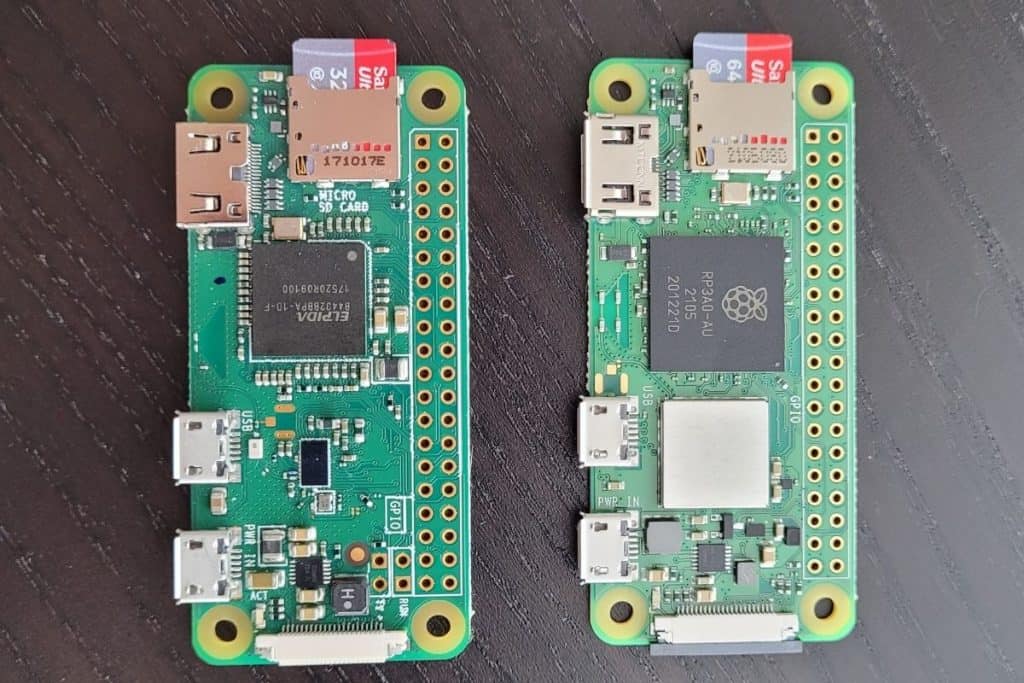
Let's talk pins. The Raspberry Pi Zero 2 W gives you 40 GPIO pins, but many of them are shared with onboard functions. You get one USB port (micro-USB, which is annoying), a mini-HDMI port, and a CSI camera connector. Wi-Fi and Bluetooth are built in, but they're handled by a separate Cypress chip. That means Linux drivers, firmware blobs, and occasional signal drops. It works, but it's not as seamless as you'd hope.
The ESP32 is a wireless beast by design. Wi-Fi, Bluetooth Classic, and BLE are all integrated on-die. No external chip, no driver hell. You flash a firmware, and it connects. Period. GPIO wise, you get around 25 usable pins on most dev boards, with multiple ADC channels, touch sensors, and hardware DACs. It also has built-in Hall effect sensor and temperature sensor (though accuracy is meh). For IoT sensors, actuators, and wireless control, the ESP32 is the obvious choice.
But here's where it gets tricky: the Pi Zero 2 W has USB host capability. You can plug in a USB camera, a keyboard, a sound card. The ESP32 can't do that without external USB-to-serial chips and a ton of fiddling. Raspberry Pi Zero 2 W also has real HDMI output. If your project needs a display with a GUI, the Pi wins. The ESP32 can drive small OLEDs or TFTs, but forget about 1080p video out.
Power Consumption and Battery Life
If your project runs on a wall outlet, stop reading this section. Power doesn't matter. But if you're building a sensor that lives in a tree or a wearable that needs to last a week, listen up. The Raspberry Pi Zero 2 W draws around 0.8 to 1.5 watts under load. Idle with Wi-Fi on, maybe 0.5W. That's fine for a few hours on a battery pack. But deep sleep? The Pi's Linux kernel makes deep sleep a nightmare. You can't truly power down the CPU without a lot of hackery. Expect hours, not days.
The ESP32 is a power miser. In deep sleep with RTC running, it consumes about 5 microamps. Yes, micro. That's 0.000005A. With a 2000mAh battery, you can run for months. Even with Wi-Fi on, transmitting every few minutes, you're looking at weeks. For battery-powered remote sensors, the ESP32 is the undisputed king. There's no comparison.
I once built a remote weather station with an ESP32 and a solar panel. It ran for two years without maintenance. I built a similar thing with a Pi Zero 2 W. The battery died in two days. Granted, I was streaming video, but still. Choose based on your power budget.
Development Experience and Ecosystem
Here's where personal preference kicks in. The Raspberry Pi Zero 2 W runs a full Linux distro—usually Raspberry Pi OS. You can write Python, C, C++, Rust, Node.js, even Go. You ssh in, install packages with apt, and treat it like a mini server. It's comfortable if you come from desktop development. But debugging low-level hardware issues is painful because you're layered on top of an OS. GPIO timing is unpredictable. I've spent days tracking down interrupt latency caused by a cron job.
The ESP32 development is closer to the metal. You use Arduino IDE, PlatformIO, or ESP-IDF (the official framework). It's C/C++ with a real-time focus. Debugging is done with serial prints or, if you're fancy, JTAG. There's no Python (unless you use MicroPython, which is a subset). The learning curve is steeper if you've only done Python. But once you get used to it, you have absolute control. No kernel stealing your cycles. No swap partitions.
For beginners, I usually recommend the Pi Zero 2 W first. It's more forgiving. You can mess up a Python script and not brick the device. On ESP32, you can easily overflow the stack or corrupt memory and wonder why nothing works. Both have large communities, but the Pi's community is more beginner-friendly. The ESP32 community is hardcore—tons of obscure forum posts in broken English. You learn to love it.
Cost and Availability
Let's talk money. A Raspberry Pi Zero 2 W costs about $15 retail. But good luck finding one at that price. Scalpers and supply chains have pushed it to $30-$40 on secondary markets. The ESP32 dev boards like the ESP32-DevKitC or NodeMCU go for $5-$10. Sometimes less. The raw chip itself is under $3 in quantity. For production, ESP32 wins on unit cost. For prototyping, the Pi's extra features may justify the premium.
But availability is a real pain. Raspberry Pis have been intermittently unavailable for years. ESP32 chips are everywhere—from Amazon to AliExpress to your local electronics shop. If you need to scale a project to dozens of units, the ESP32 is the pragmatic choice. You can even get ESP32 variants with built-in LCD, camera, or LoRa. The Pi Zero 2 W is more of a general-purpose board.
Use Case Showdown: When to Choose Which
Let's get practical. I've categorized common project types. Pick your lane.
- DIY security camera with motion detection: Raspberry Pi Zero 2 W. It can run OpenCV, stream video, and save files. ESP32 can't handle video. - Bluetooth temperature sensor sending data to phone: ESP32. Low power, BLE built-in, easy pairing. - Retro gaming emulator: Raspberry Pi Zero 2 W. Needs HDMI and CPU power for emulation. ESP32 can't. - Robot arm with precise servo control: ESP32. Real-time PWM, hardware timers, no OS jitter. - Web server for smart home dashboard: Raspberry Pi Zero 2 W. Can run Node-RED, Flask, or even a database. - Wireless sensor node in a greenhouse: ESP32. Deep sleep, solar charge, cheap. - Learning Linux and programming: Raspberry Pi Zero 2 W. Full OS, desktop-like experience.
See the pattern? If you need video, complex OS services, or high-level languages, go Pi. If you need low power, real-time control, or wireless IoT, go ESP32.
Common Questions About Raspberry Pi Zero 2 W vs ESP32
Can the ESP32 run Python?
Yes, but it's MicroPython or CircuitPython, not full CPython. You lose access to many libraries, and performance is slower than C. For simple tasks, it works. For heavy lifting, stick with C/C++.Is the Raspberry Pi Zero 2 W faster than the ESP32?
In raw computing benchmarks like integer operations, the Pi is about 5-10x faster. But for real-time tasks, the ESP32's deterministic behavior often makes it feel faster. Speed isn't just clock rate.Which one is easier for beginners?
The Raspberry Pi Zero 2 W is easier if you already know Python or Linux. The ESP32 has a steeper learning curve due to C programming and hardware intricacies. But if you're comfortable with Arduino, the ESP32 feels natural.Can I use both together in one project?
Absolutely. I've done it. Use the ESP32 as a sensor node and the Pi as a central hub. They communicate over UART, SPI, I2C, or Wi-Fi. Best of both worlds.Which one has better Wi-Fi range?
The ESP32 has a better integrated RF design. Onboard antenna gives decent range—about 50 meters indoors. The Pi Zero 2 W's Wi-Fi is okay but more prone to interference. For long range, add an external antenna to the ESP32.---
Pick the tool that fits the job. Don't force a square peg into a round hole. I've seen too many projects fail because someone wanted to use a Pi for a simple temperature logger. Or tried to run a web API on an ESP32 with 500KB of RAM. Know your constraints. Measure twice, buy once. You'll thank yourself later.