
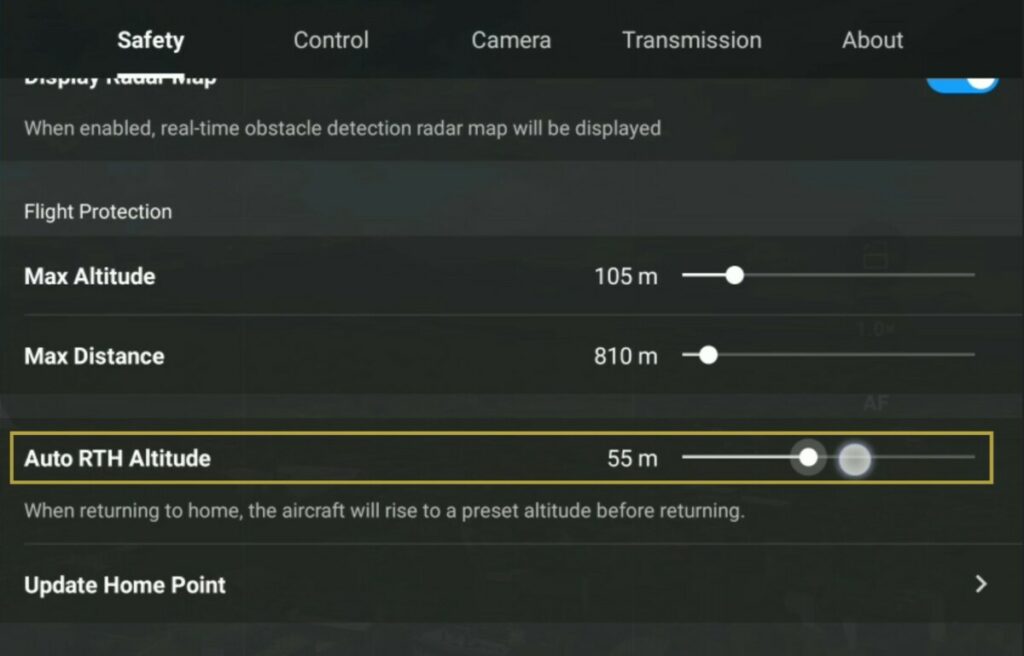
Optimizing RTH Altitude for Your DJI Mini 3 Flights
You’re cruising your Mini 3 over a gorgeous patch of woods, the battery hits 25%, and you hear that familiar buzz of the Return-to-Home (RTH) sequence activating. The drone climbs… and climbs… and climbs. By the time it levels off, you’ve lost a solid 10% of your remaining battery just to altitude. Then, on the way back, it sails serenely over the trees—only to descend perfectly into the middle of a 50-foot pine tree on your landing pad. Sound familiar?
I’ve seen this exact scenario cause more “unexpected landings” in the field than actual signal loss. The default RTH altitude on the DJI Fly app is often set to a very conservative 30 meters (about 98 feet). For a sub-250-gram drone that already struggles against a stiff breeze, that setting can either save your drone or turn a routine flight into a risky battery gamble. Let’s cut through the noise and talk about setting this properly.
#### Why Your Default RTH Altitude Is Probably Wrong
The factory setting is a compromise designed to keep beginners out of trouble. But here’s the uncomfortable truth: a one-size-fits-all altitude doesn’t exist. An open field flight requires zero vertical buffer, while flying over a river valley with 200-foot cliffs demands you bump that number way up.
The Tree Line Trap
Most amateur pilots set their RTH altitude based on the trees they see at takeoff. That’s a rookie mistake. Look—the trees you see from the ground might be 30 feet tall, but the ones 500 meters away could easily be 100 feet. When your drone loses signal and initiates return to home, it doesn’t care about the landscape beneath you. It just climbs to the preset height and flies in a straight line. If that line intersects a ridgeline or a cell tower, you’re going to have a bad day.
- Always survey the highest obstacle within a 1-kilometer radius of your flight path. - Account for power lines, radio towers, and construction cranes. - Remember that tall grass and bushes don’t count—trees and man-made structures do.
The Signal Loss Panic
When the remote controller link drops, your Mini 3 has a critical decision to make. It can either ascend to the optimal RTH altitude you set, or it can land immediately if the battery is critically low. If you’ve set the altitude too low, the drone might try to fly home through a hillside. If you’ve set it too high, you waste precious battery climbing.
Honestly? The most common mistake I see is pilots setting their RTH altitude setting to 120 meters (the legal max in most countries) for every flight. That’s excessive for a backyard flight and drains battery like a sieve. You need a dynamic approach based on the terrain.
#### The Golden Formula for Setting Your Optimal RTH Altitude
There’s no magic number, but there is a repeatable process I’ve used on hundreds of flights. It boils down to three variables: obstacle height, wind profile, and battery reserve.
Mapping the Local Obstacle Height
First, you need an accurate height of the tallest obstacle within your planned radius. Don’t eyeball it. Use a topographic map app (like Google Earth or a dedicated flight planning tool) to measure the highest point of elevation plus the tallest object on top of that elevation.
- If the tallest hill is 50 meters above your takeoff point, and there’s a 30-meter communications tower on top, you now have a minimum obstacle clearance height of 80 meters. - Add a 20-meter safety margin for wind gusts and GPS drift. That’s 100 meters minimum. - Now set your optimizing RTH altitude for your DJI Mini 3 flights to that 100-meter mark.
Seriously, don’t skip the GPS drift part. The Mini 3’s GPS isn’t perfect in high winds, and it can drift 5-10 meters off course during the RTH flight. If you’re hugging the treeline, that drift can be catastrophic.
Adding the Safety Buffer
Your optimal RTH altitude isn’t just about clearing physical objects—it’s about managing the descent. When the Mini 3 reaches its home point, it descends vertically. If you live in a house with a roof that’s 8 meters high, your home point is on the roof. The drone will descend down to that exact altitude.
So your buffer calculation should include the height of your takeoff landing zone. If you’re flying from a hilltop, the obstacle height below you might be lower than the obstacle height in your flight path. This is where a little math goes a long way:
- Obstacle height (in meters) + 20-meter wind buffer + 5-meter descent buffer = RTH altitude setting.
#### Battery Management and Your RTH Altitude Setting
This is the part that makes experienced pilots grimace. Every meter of altitude you gain costs battery. On a calm day, climbing from takeoff to 30 meters costs about 2-3% of your battery. Climbing to 120 meters can cost 8-10% of your battery. That’s a huge chunk of your flight time.
The Energy Cost of Climbing
But wait—there’s a silver lining. When you initiate RTH early, the climb happens while you still have ample battery. The real problem is when you fly until you hear the low battery warning and then the drone suddenly needs to climb 100 meters. That vertical climb at low battery can trigger an immediate landing sequence because the voltage drops too steeply.
- Smart move: Set your RTH altitude before you launch, not during the flight. - Smartest move: If you’re flying over flat terrain, drop the altitude to 30-40 meters to save battery. - Smarter move: If you’re flying over mountains, accept the battery hit and set it to 130 meters.
When to Bump It Up vs. Keep It Low
Here’s a cheat sheet I give to the pilots I mentor:
- Open fields, beaches, or water: 30-40 meters is plenty. Save the battery. - Forests with tall trees: Set it to 50-70 meters. Trees are deceptive. - Urban areas with buildings: Set it to the height of the tallest building plus 20 meters. Never skimp here. - Mountainous or canyon terrain: Set it to 120-150 meters. Honestly, if the terrain is that variable, consider manual flying home instead of relying on RTH.
A common mistake is treating return to home as a passive safety net. It’s not. It’s an active flight mode that consumes battery and respects no obstacles. Treat it with the same seriousness you’d treat a manual landing.
#### A Quick Rule of Thumb for Pre-Flight Checks
Before every launch, I do a two-minute visual scan and mental calculation. It’s saved my Mini 3 from becoming a tree ornament at least a dozen times.
The Visual Scan
Stand at your takeoff point and look around 360 degrees. Note the highest object within 500 meters. Now, look up. Are there any power lines or radio towers that are hard to see from the ground? If you can’t spot them, study a satellite image on your phone.
- Identify the highest object’s height. - Identify the highest ground elevation between you and that object. - Add them together.
The Quick Math
Take that total, add 10-15 meters for safety, and set your RTH altitude setting in the app. Then, before you take off, verify that your home point has been updated (green checkmark in the app). If the home point hasn’t locked, your RTH is flying blind.
One more thing: if you’re flying in an area with tall obstacles and high winds, manually fly the drone back if you can. RTH is a convenience feature, not a rescue feature. The second you see the signal strength drop below 50%, start heading back yourself. Don’t wait for the failsafe to trigger.
Common Questions About Optimizing RTH Altitude for Your DJI Mini 3 Flights
Why does my Mini 3 still hit trees even with RTH altitude set high?
Your drone’s home point might be incorrect due to GPS drift. The RTH altitude you set is relative to your takeoff point, not the obstacles in the environment. If the GPS lock is weak (fewer than 10 satellites), the drone can drift up to 15 meters laterally during the RTH flight. Always check the satellite count before takeoff. Also, remember that trees sway in the wind—if your safety margin is only 5 meters over a 30-meter tree, a gust can push it into the canopy.
How does wind affect my optimal RTH altitude setting?
Wind is the silent killer of RTH efficiency. In strong winds, the Mini 3 struggles to maintain altitude while flying into a headwind. The drone will pitch aggressively to maintain speed, which can increase power consumption by 30-40%. If you’re flying in winds above 15 mph, add 10-15 extra meters to your RTH altitude to account for the drone’s inability to climb quickly under load. And don’t rely on RTH in winds over 20 mph—you’ll likely need to manually fight the wind to get home.
Can I change the RTH altitude during flight?
Yes, you can. Open the DJI Fly app, go to the Settings menu (three dots), find the Safety tab, and adjust the RTH altitude slider. However, I recommend doing this only when you are stationary or at a low altitude. Changing it while in fast forward flight can cause confusion with the flight controller. It’s a simple slider, but don’t twiddle it while you’re already low on battery.
What happens if my battery is too low for the RTH climb?
If the drone determines that it doesn’t have enough battery to climb to the set RTH altitude and make it home, it will initiate a descending landing immediately. This is a failsafe to prevent an uncontrolled crash. The downside is that you might land in a tree or water. The solution is to avoid flying until the low battery warning becomes critical. Set your RTH altitude lower when you know you’re low on battery, or manually fly the drone back before the warning triggers.
Is there a legal limit to RTH altitude?
Yes. In most countries, the legal maximum altitude for consumer drones is 400 feet (120 meters) above ground level. Your optimizing RTH altitude for your DJI Mini 3 flights should never exceed this limit unless you have special permission. Additionally, in some airspace zones (like near airports), the RTH altitude might be capped by geofencing. Always check local regulations because setting your RTH to 150 meters in a zone that allows only 50 meters can trigger your drone to auto-land.
What I’ve learned over a decade is that the optimal RTH altitude isn’t a number you memorize—it’s a decision you make for each flight. The Mini 3 is a fantastic little machine, but it has no common sense. It will fly straight into a mountain if you tell it to. So you be the smart part of the equation. Set the altitude with intention, respect the battery, and always have a manual plan B. That’s how you keep your drone coming home.