
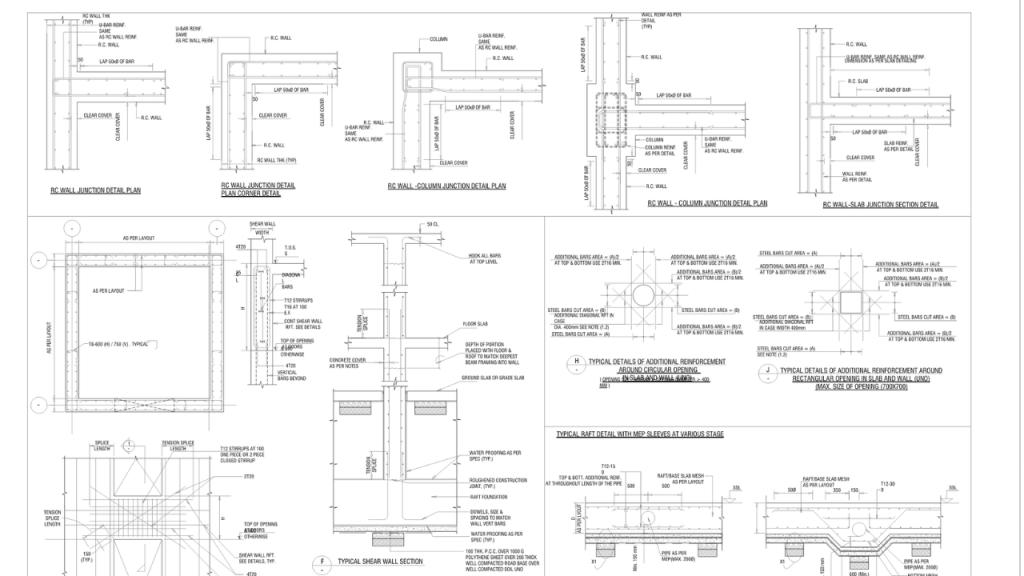
Reading Structural Engineering Symbols on Architectural Drawings
I still remember my first week as a junior engineer, staring at a set of plans for a mid-rise building. I could read the floor plan just fine—the walls, the doors, the windows. But then my senior pointed to a tiny circle with a crosshatch and asked, 'What's the column schedule say?' I froze. Honestly? I had no clue that little symbol was shorthand for a reinforced concrete column tied to a specific note 50 pages back. That moment taught me one thing: reading structural engineering symbols isn't just a skill. It's a survival mechanism.
Look—if you're an architect, a contractor, or a curious homeowner, architectural drawings are basically a foreign language. They're packed with structural engineering symbols that turn a simple beam into a cryptic hieroglyph. But here's the good news: once you crack that code, you'll see the skeleton of the building. And that's a big deal. Let's dive into the real-world stuff that actually matters when you're trying to figure out what those lines and squiggles mean.
The Alphabet Soup of Structural Symbols
When you first crack open a set of architectural drawings, the structural sheets look like someone spilled a box of Legos and labeled every single piece. You've got circles, triangles, dashed lines, double lines, and letters that seem random. They aren't. Each symbol carries a specific weight (literally). Structural engineering symbols are standardized through organizations like the American Institute of Steel Construction (AISC) and the American Concrete Institute (ACI). But here's the kicker: not every firm follows them perfectly.
I've seen offices where a little 'W' means 'wide flange beam,' and other offices where it means 'wood.' Seriously. That's why you always check the symbol legend on Sheet S-001. It's the Rosetta Stone. Without it, you're guessing. And guessing on a structural plan gets expensive fast.
Breaking Down the Material Markings
One of the first things I teach newbies is how to spot material based on the structural engineering symbols for steel versus concrete versus wood. Steel beams usually get a designation like 'W12x26.' That tells you it's a wide flange, 12 inches deep, weighing 26 pounds per linear foot. Simple, right? But on architectural drawings, that same beam might be shown as a single thick line with the label written above it. The symbol for a concrete beam? Totally different. It often appears as a rectangle with a dashed diagonal line or a hatch pattern.
Wood framing is its own beast. You'll see '2x12' or 'GLB' (glulam beam) with a reference to a detail drawing. The key is context. A dashed line with two ticks on a foundation plan usually indicates a structural engineering symbol for a concrete footing. But on a roof framing plan, that same dash might mean a ridge beam. Don't assume. Check the legend. It's a big deal.
- Steel Beams: Look for 'W', 'S', or 'C' shapes followed by depth and weight. Symbol often a thick single line.
- Concrete Columns: Usually a crosshatched square or circle with a reference number like 'C-1'. Check the column schedule.
- Wood Joists: Parallel dashed lines with a label like '2x10 @ 16" O.C.' Spacing is critical here.
- Masonry Walls: A diagonal hatch pattern or a 'CMU' label (concrete masonry unit).
Grid Lines: The Invisible Skeleton
If structural engineering symbols are the vocabulary, the grid lines are the grammar. Every plan starts with grid lines—usually numbered in one direction (1, 2, 3) and lettered in the other (A, B, C). These aren't just decoration. They are the absolute reference system. When a note says 'W18x35 at Grid B-4,' you know exactly where to look. Without these, you're lost.
Here's a trick I picked up after 10 years: always trace a column or wall back to its grid intersection. I've seen contractors pour a footing 12 inches off because they misread a symbol that was one square off. That's a six-figure mistake. The grid lines also show you how the structural engineering symbols relate to the architectural drawings. The architect's walls line up with the structural grid. If they don't, you've got a coordination problem. And trust me, you don't want to find that problem on site.
The Hidden Language of Lines and Hatching
Lines aren't just lines. In structural engineering symbols, the line style tells you the story. A solid thick line usually means a structural element (beam, column, or wall). A dashed line often indicates something hidden or above the cut plane. But then you get into the weeds: a long dash-short dash pattern might mean a steel joist, while a dotted line could mean a furred-out beam that's actually above the ceiling. It's a system of visual shorthand.
Now, hatching is where it gets artistic. Concrete is often hatched with small dots or little triangles. Steel is usually a solid fill or a simple diagonal line pattern. Wood shows up as a series of parallel curves (like growth rings). But here's the problem: architectural drawings sometimes use different hatching just for looks. I've seen architects use a concrete hatch for a steel beam by accident. That's why you always cross-reference the symbol with the label. Don't just rely on the fill pattern.
Reading Beam Schedules and Callouts
A beam schedule is like a cheat sheet. It's a table that lists every beam on the plan, its size, its material, and its reinforcement. When you see a circle with a line pointing to a beam, that's a callout. It might say 'B-101'. You flip to the schedule and find 'B-101: W16x40, A36 steel.' Done. But sometimes they get tricky. The structural engineering symbols on the schedule might use abbreviations like 'PL' (plate) or 'ANG' (angle).
I once had a plan where the callout said 'B-101' but the schedule listed it as a concrete beam. The symbol on the plan was a steel beam outline. You know what that means? Someone messed up. Always, always verify that the symbol in the drawing matches the schedule. It's boring, but it saves your bacon. Use a highlighter. Yes, a physical highlighter. Mark each beam as you check it.
- Find the beam callout (usually a circle with a leader line).
- Read the label (e.g., 'B-101').
- Locate that label in the beam schedule.
- Confirm the material and size match the structural engineering symbols shown.
- Check the span and support conditions (simply supported vs. continuous).
Decoding Column and Foundation Symbols
Columns are the vertical heroes of any building, and their structural engineering symbols are usually the most distinct. A steel column might be shown as a cross-section with a 'W' shape. A concrete column is often a larger square or circle with a dot in the center (that's the vertical rebar). Foundation symbols are even more telling. A spread footing looks like a trapezoid or an inverted T. A pile cap is a thick rectangle with dots representing piles underneath.
Here's a common mistake I see: people confuse a column symbol with a grade beam symbol. A column is usually a single element with a specific grid location. A grade beam connects columns and looks like a long narrow rectangle with a hatch. If you misread that, you might think the foundation is a monolithic slab when it's actually a series of beams. Huge difference in cost and structural behavior. Reading structural engineering symbols correctly on foundation plans is non-negotiable. It's the difference between a building that stands and one that settles.
Common Questions About Reading Structural Engineering Symbols on Architectural Drawings
Why do some symbols look different from one drawing to another?
Great question. Even though there are standards (like those from AISC or ACI), different engineering firms develop their own internal standards. Some legacy firms use hand-drafting conventions from the 1980s. Newer firms use BIM software like Revit, which auto-generates structural engineering symbols that look slightly different. The key is to always read the symbol legend on the specific set of architectural drawings you're using. Never assume.
Can I learn to read these symbols on my own without formal training?
Absolutely. I started by buying a used copy of "Architectural Graphic Standards" and literally tracing symbols with tracing paper. It sounds silly, but it works. You can also find free PDF guides from steel and concrete institutes. The real learning happens when you take a set of architectural drawings and a highlighter, and you walk through a built project. Look at the framing plan, then go look at the actual building. It clicks.
What is the most common symbol that people misinterpret?
Without a doubt, it's the 'dimension line' vs. the 'structural reference line'. A dimension line has arrows on both ends and a number. A structural engineering symbol that marks a grid line has a circle with a letter or number inside. People confuse these all the time thinking a dimension is a grid reference. Also, the 'hidden line' for beams above the cut plane is frequently missed, leading contractors to think a beam doesn't exist when it does.
Do I need to know all the symbols before starting a project?
No, but you need to know the critical ones. Focus on grid lines, column symbols, beam callouts, and foundation symbols. Those are the backbone. You can learn the rest (like bracing details or anchor bolt patterns) as you encounter them on a specific project. Most experienced engineers keep a cheat sheet on their desk. There's no shame in that. Reading structural engineering symbols is a skill that builds over time.
How do digital drawings (PDFs vs. BIM) change symbol readability?
PDFs are static, so you're stuck with what you see. BIM models (like Revit) are dynamic. In a Revit view, the structural engineering symbols can change appearance based on the level of detail. A beam might look like a simple line in a 'coarse' view and show its full flange shape in a 'fine' view. That's powerful, but it also means you need to check your view setting before you take measurements. I've seen people take dimensions from a coarse view and wonder why the beam doesn't fit. Always confirm the view scale and detail level.
Reading will help you to improve your understanding of english and your vocabulary. Find reading tests for every level. In the us, it was reported in 2022 that less than half of adults reported reading a book in the past 12 months. Improve your english reading skills. Perfect for learners and teachers. [14] furthermore, only 38 percent reported reading fiction or short stories, a rate that has. Are you looking for activities to practise your english listening skills? The learning materials in this section are written and organised by level. Browse and filter through our collection of 1000+ free online ielts reading practice tests & solutions based on type. Improve your reading and comprehension with free english stories, worksheets and teaching materials.