
Why GPS Coordinates are Often Treated as Semi-Structured Data
Ever try to plug a set of coordinates into Google Maps only to end up in the middle of a cornfield instead of that restaurant you were aiming for? Yeah, I’ve been there. And it’s not just bad luck. It’s the data.
Let me break this down for you. I’ve spent over a decade cleaning up messy location datasets, building geospatial pipelines, and yelling at poorly formatted latitude values. Here's the cold hard truth: GPS coordinates look like they should be the most structured data in the world. Two numbers. A decimal point. How hard can it be?
Turns out, it’s a nightmare.
GPS coordinates are often treated as semi-structured data because they arrive from a thousand different sources in a thousand different flavors. You think you’re getting clean decimal degrees? Nope. You get degrees, minutes, seconds. You get DDM. You get UTM. You get someone pasting '41.40338, 2.17403' into a CSV cell that also includes a comment like “near the big tree.” Seriously. I’ve seen it.
The Illusion of Simplicity
The first time a junior developer sees a coordinate pair, they usually think, “Oh, I’ll just store it as two floats.” That sounds simple. It’s not. Let me explain why that approach falls apart faster than a cheap lawn chair.
The Strict Format Doesn't Exist
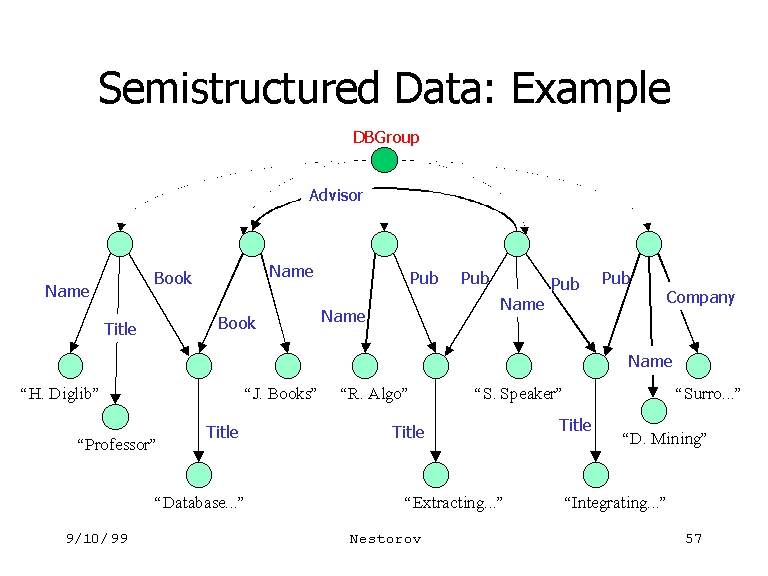
Here’s the thing. Semi-structured data has a schema that is flexible, irregular, or self-describing. Think JSON or XML—it has tags and labels, but the fields can vary. Now look at GPS coordinates. Do they have a universal schema? Not really.
You get data in these formats: - DD (Decimal Degrees): 41.40338, 2.17403 - DMS (Degrees Minutes Seconds): 41° 24\' 12.2\" N, 2° 10\' 26.5\" E - DDM (Degrees Decimal Minutes): 41 24.2028, 2 10.4418 - MGRS (Military Grid Reference System): 31T DG 55903 23562 - UTM (Universal Transverse Mercator): 31N 372413 4583928
Each of these is a completely different “language.” And yet they all represent the same location on Earth. That’s the definition of semi-structured data—the meaning is there, but the container changes every time.
The Missing Context
Look—when I say “41.40338, 2.17403,” you likely assume it’s WGS84, the standard for GPS. But what if someone handed you coordinates from NAD83? Or WGS72? Or the local datum for some island in the Pacific?
Most people don't include the datum. They just give you the numbers. That’s like handing someone a phone number without the country code. The data is structurally close to being structured, but it lacks the metadata needed to interpret it correctly. That’s why GPS coordinates live in the semi-structured zone.
It's a big deal because a 50-meter shift in datum can put a boat on a reef or a construction crew on the wrong property line. Honestly? Most datasets I’ve worked with are missing this critical information.
The Real-World Mess
Now let’s talk about what happens when you actually try to use this data in production. You have a pipeline. You have a database. You have users typing coordinates into a form. It gets ugly fast.
Multiple Standards, One Field
I once worked with a logistics company that collected GPS coordinates from delivery drivers. The drivers used three different apps. One app output DD, one output DMS, and the third output UTM. All of it landed in the same database column as free text.
Here’s what that column looked like:
- 40.7128° N, 74.0060° W - 40°42\'46\" N 74°00\'22\" W - 18T 523574 4508210 - “Somewhere near the Starbucks on 5th”
The last one? That's not even coordinates. That’s a description. But the system accepted it because the field was defined as a string. That is semi-structured data at its finest—a column that is supposed to hold location data but actually holds whatever a human decides to type.
Precision vs. Display
Another thing nobody tells you: GPS coordinates are continuous values. You can measure them to 10 decimal places if you want. But most people only care about 4 or 5 decimal places for general use. So when you get data from different devices, the precision varies wildly.
A smartphone GPS might give you 41.40338. A survey-grade Trimble unit gives you 41.403381234. A user copying from Google Maps gives you 41.4034.
All of these look like structured numbers. But when you try to join two tables on the coordinate field, you get zero matches because the precision doesn’t align. Suddenly, that structured field behaves like an unstructured mess. You end up needing to round, truncate, or tolerate fuzzy matching. That’s semi-structured behavior.
How to Handle This Semi-Structured Beast
So you’re stuck with messy GPS coordinates. What do you actually do about it? I’ve built enough geospatial ETL pipelines to give you a solid game plan.
Validation is Step One
The first thing you need to do is stop assuming the data is clean. Treat every incoming coordinate as suspect until proven otherwise.
Implement a validation layer that checks for: - Format detection: Is this DD, DMS, or something else entirely? - Range checking: Latitude should be -90 to 90, longitude -180 to 180. You’d be shocked how often I see 200° as a longitude. - Pattern matching: Does the string match a known pattern for coordinates? - Null handling: Empty fields that pretend to be coordinates. Yes, that happens.
This validation layer is what separates structured data from semi-structured data. You are essentially imposing a schema after the fact.
Normalization is Key
Once you know what format you’re dealing with, normalize everything to a single standard. I always recommend WGS84 decimal degrees with 6 decimal places. It’s universal, it’s precise enough for most use cases, and it plays nicely with modern mapping APIs.
Here's how I structure the normalization pipeline:
1. Parse the input string to detect format. 2. Convert to DD using a library or custom function. 3. Validate the output range. 4. Store the normalized value in a dedicated numeric field. 5. Keep the original raw string in a separate column for auditability.
That last step is crucial. You never want to destroy the original semi-structured data because you might need to reprocess it later.
The Business Case for Semi-Structured Treatment
Some people argue that GPS coordinates are fully structured because they fit into two columns. Those people have never dealt with real-world data. Let me give you three reasons why treating them as semi-structured data actually saves you money and headaches.
Flexibility Across Sources
Your business will inevitably get data from partners, APIs, web scrapers, and manual uploads. If you force a rigid schema upfront, you’ll reject valid data or corrupt it. Treating the input as semi-structured data allows you to accept a wide range of formats while still enforcing consistency in your core systems.
It’s the difference between a bouncer who checks IDs and one who just lets everyone in. You want the smart bouncer who can handle multiple ID types.
Error Tolerance Without Data Loss
When you treat coordinates as semi-structured data, you build in tolerance for human error. A user types “41.40338, 2.17403” but adds a space after the comma. Your parser should handle that. A CSV export wraps the field in quotes. Your import should handle that. A GPS device outputs a negative sign as a hyphen. Your system should handle that.
Rigid systems break on these edge cases. Flexible systems log the issue, fix it, and move on.
Historical Data Integrity
You know what happens to rigid databases over 10 years? They rot. Standards change, new formats emerge, and old data becomes unreadable. By preserving GPS coordinates as semi-structured data with original raw strings and metadata tags, you future-proof your location data. Twenty years from now, someone can parse it with whatever new library exists.
Common Questions About GPS Coordinates as Semi-Structured Data
What exactly makes GPS coordinates semi-structured instead of structured?
Structured data has a fixed schema with defined fields and data types. GPS coordinates often lack a consistent format, precision, or associated metadata like datum or coordinate system. They may also be mixed in with other text, like “N 40° W 74°,” which requires parsing. That flexibility and lack of rigid structure places them in the semi-structured data category.
How do I detect the format of incoming GPS coordinates?
You write pattern-matching rules or use a geospatial parsing library. Look for degree symbols, direction letters (N/S/E/W), and the number of decimal places. For example, a string with “°” and “\'” is likely DMS. A string with six digits then seven digits is likely UTM. A simple float between -90 and 90 is likely DD.
Should I always store coordinates as decimal degrees?
Yes, for internal processing and storage. Decimal degrees in WGS84 are the industry standard and are compatible with almost all mapping tools. But always keep the original semi-structured data for auditing and reprocessing.
Can I use a regular expression to validate all GPS coordinate formats?
No. A single regex cannot handle all formats (DD, DMS, DDM, UTM, MGRS) reliably. You need a combination of format detection, range checking, and possibly a parsing library like proj4js or geopy. Regex is great for pattern matching but fails on contextual validation.
What happens if I treat GPS coordinates as strictly structured data?
You will lose data. Invalid entries will be rejected, valid formats you didn’t account for will be corrupted, and human errors will silently break your pipeline. Treating them as semi-structured data gives you the flexibility to handle the messy reality of real-world location information.