
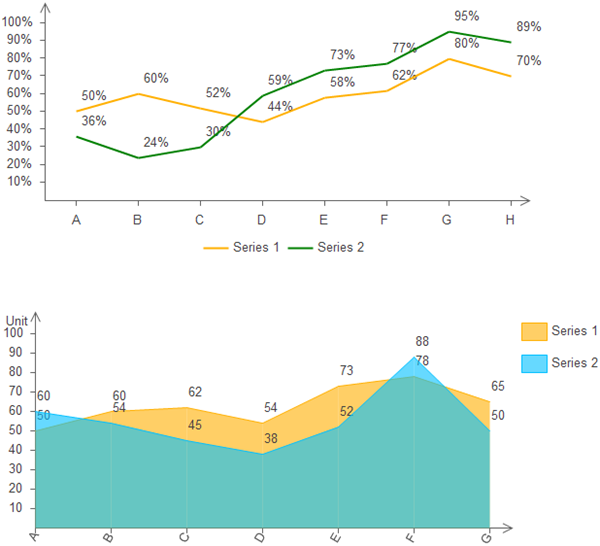
Choosing Between Line and Area Charts for Trends
You've spent hours cleaning your data, only to freeze when it's time to choose the chart. Line or area? It seems trivial, but I've seen brilliant analysts torpedo their insights with the wrong pick. Seriously. They end up with a chart that screams "look at the shape" when the real story was about magnitude. Let's fix that.Look—I've been building dashboards and visualizations for over a decade. I've made every mistake in the book, including that one time I used a stacked area chart for overlapping trend lines. The result? A visual mess that looked like a rainbow had thrown up on the screen. Don't be that person. The key to choosing between line and area charts for trends isn't a guessing game. It's about understanding what you want your audience to feel.
The Core Difference: It's All About the Baseline
Every data visualization tool gives you both options, but most people treat them as interchangeable. They aren't. The single most important thing to understand is the role of the baseline. A line chart focuses on the trajectory of the data points. It says, "Look at how this thing moves over time." An area chart fills the space beneath that line. It says, "Look at the magnitude and the volume of this thing over time." That fill changes everything.You see, the human brain is wired to process shapes and surfaces. When you fill that space, you're not just showing a line; you're creating a visual entity with weight. It's a cognitive shortcut. If your goal is to highlight a specific trend or pattern—say, a seasonal dip in sales—a plain line is often cleaner. But if you want to emphasize the sheer size of that trend compared to zero, the area fill becomes your best friend. Honestly, it's one of the most underrated tricks in the data visualization playbook.
When Line Charts Shine in Trend Analysis
Let's talk about precision. In my experience, a line chart for trend visualization is the gold standard when you have multiple series that you need to compare. Imagine plotting the quarterly revenue of three different product lines over five years. You want to see which line is growing faster, which one is flat, and which one is crashing. An area chart here would be a disaster. The fills would overlap, creating a confusing mess of colors and making it impossible to see the lower series.Furthermore, line charts excel when your data has a lot of noise or volatility. Think stock prices. A filled area chart for daily stock prices would look like a jagged mountain range with zero insight. The fill distracts from the trend itself. You want a clean, sharp line that lets the eye trace the ups and downs without being overwhelmed by the visual weight of the fill. The rule is simple: if the story is in the path, not the volume, use lines.
Another scenario is when you have a dataset with a changing baseline or negative values. Area charts assume a baseline of zero. If you're tracking profit margins that fluctuate between positive and negative, an area chart will literally fall into the ground. It creates a confusing visual gap that raises more questions than it answers. Stick with lines for any data that crosses the zero axis. It's cleaner, more honest, and far easier to read.
The Area Chart Advantage: Showing Magnitude and Momentum
Now, let's flip the script. An area chart for trends is a powerhouse when you want to show how something accumulates or how big a part of the whole it represents. The classic example is cumulative website traffic or total users over time. The fill visually reinforces the idea of "we have more and more of this thing." It creates a sense of gravity and scale. It's a big deal when you're trying to sell a vision of growth to stakeholders.I also love choosing an area chart for showing a single series where the emphasis is on the magnitude of change relative to zero. For instance, showing the total carbon emissions of a company over a decade. The filled area makes the growth feel visceral. You can almost feel the weight of the increase. It's not just a line going up; it's a massive wedge of color expanding over time. That emotional pull is a legitimate communication tool.
Stacked area charts are a different beast, and they need a special warning. While they can be effective for showing the composition of a total over time (like the breakdown of traffic sources), they become nearly unreadable with more than three categories. The top line is easy to read, but the bottom layers have jagged, unpredictable baselines that make trend comparison impossible. Use them sparingly, and only when the total is the main story.
Practical Principles for Chart Selection
So how do you actually decide? Stop thinking about it as a binary choice. Think about it as a spectrum based on data density and storytelling goals. I have a simple mental checklist I run through every time. First: how many series am I plotting? Second: is the baseline zero, and does that matter? Third: what is the single question I need this chart to answer? If you can answer those three things, the path becomes clear.Let me give you a real-world example. I once had to present user engagement across four different features over six months. The VP of Product wanted to see which feature was gaining traction. I started with a multi-series area chart. It was a disaster. The overlapping fills made everything look like a muddy puddle. I switched to a clean line chart for trends with a subtle dashed line for the baseline. Instantly, she could see the steep climb of Feature A and the plateau of Feature B. The visual hierarchy was restored.
Visual Hierarchy and Data Density
Here's a hard truth: most dashboards suffer from visual clutter. When you have to display trend analysis for many categories on one screen, an area chart is often a liability. The solid fills compete for the viewer's attention, making it hard to focus on any single trend. Instead, use a line chart and rely on other visual cues like line weight, color saturation, and marker points to create hierarchy.If you really feel the need for an area fill with multiple series, use a transparency fill. This is a pro tip that I don't see often enough. Instead of a solid color, use a 20-30% opacity fill. This allows overlapping areas to blend rather than obscure. It preserves the sense of magnitude for the topmost series while still giving you a hint of the volume beneath. It's not perfect, but it's a massive improvement over the default solid fill.
The Transparency Trap and Other Pitfalls
But even transparency has limits. If you have three or more series with similar values, the overlapping transparent fills create a dense, dark region where they intersect. It creates a false visual "hot spot" that doesn't correspond to any real data point. That's bad. In that case, you have to accept that the chart selection for trends must default to lines. No fill at all. Just clean lines with distinct patterns or dash styles for accessibility.Another pitfall is using an area chart to hide a data gap. I've seen analysts use a solid fill to disguise a period of missing data. The fill smooths over the gap visually, making it look like the trend continued. That's a bad practice. A line chart would show a clear break in the line, which is honest and transparent. Always choose clarity over aesthetics. Your audience deserves to see the whole story, including the messy parts.
Common Questions About Choosing Between Line and Area Charts for Trends
Can I use an area chart for multiple overlapping trend lines?
Technically, yes, but I strongly advise against it unless you have a heavy transparency fill and only two or three series. For more than three, the overlapping fills create visual noise and make it almost impossible to compare individual trends. You are far better off using a line chart with different colors and stroke styles. Your audience will thank you.
When is the best time to choose a stacked area chart?
Use a stacked area chart when your primary story is about the total and you only need a rough sense of how the parts contribute. For example, showing total monthly sales where the decomposition by region helps you see which region drives the bulk of the growth. Avoid it for precise trend comparison between the individual components. The bottom layers have a moving baseline that distorts perception.
Does the type of data affect my choice between line and area charts?
Absolutely. If your data contains negative values or crosses the zero baseline, default to a line chart for trends. An area chart fills to zero, which creates a very confusing visual when the line dips below the axis. Also, consider the density of your data. For high-frequency data like stock ticks, a line chart offers better precision. For cumulative data like total revenue year-to-date, the area chart adds meaningful context.
How do I handle overlapping area fills without losing information?
Use a low opacity fill (20-30%) and order your series carefully. Place the most important series on top, so it has the cleanest visual baseline. The bottom series will be partially obscured, but you can still perceive their shape through the transparency. Another option is to use a "stepped" area chart that shows discrete values rather than smooth curves, which reduces the ambiguity of overlapping fills.
Is it ever okay to combine line and area elements in one chart?
Yes, but do it with purpose. A common effective pattern is to use an area chart for the total (e.g., total site visits) and a line chart overlaid for a specific subset (e.g., visits from a new campaign). This creates a clear visual hierarchy. The area gives you the context of the whole, while the line highlights a specific trend within that context. Just ensure the line has a distinct, heavy stroke so it doesn't get lost in the fill.
Gr:guaranteed reagent(优级纯试剂) ar:analytial reagent(分析纯试剂) cp:chemical pure(化学纯试剂) lr:laboratory reagent(实验试剂) 优级纯(gr,绿标签):主成分含量很. Annunci e regole importanti annunci, regole importanti e istruzioni d'uso del forum grnet.it dedicate ai nuovi iscritti e a chi vuole orientarsi nelle sezioni. Gr是收货,ir是收票,grir就是收货收票清账科目。 grir科目 平时应清账。若规定必须ir才可以gr,其实质是 应付暂估 科目。若对ir,gr没有先后顺序,它是一个过渡科目,月末需要run一个程.