
How to Secure a Star Topology Network Against External Intruders
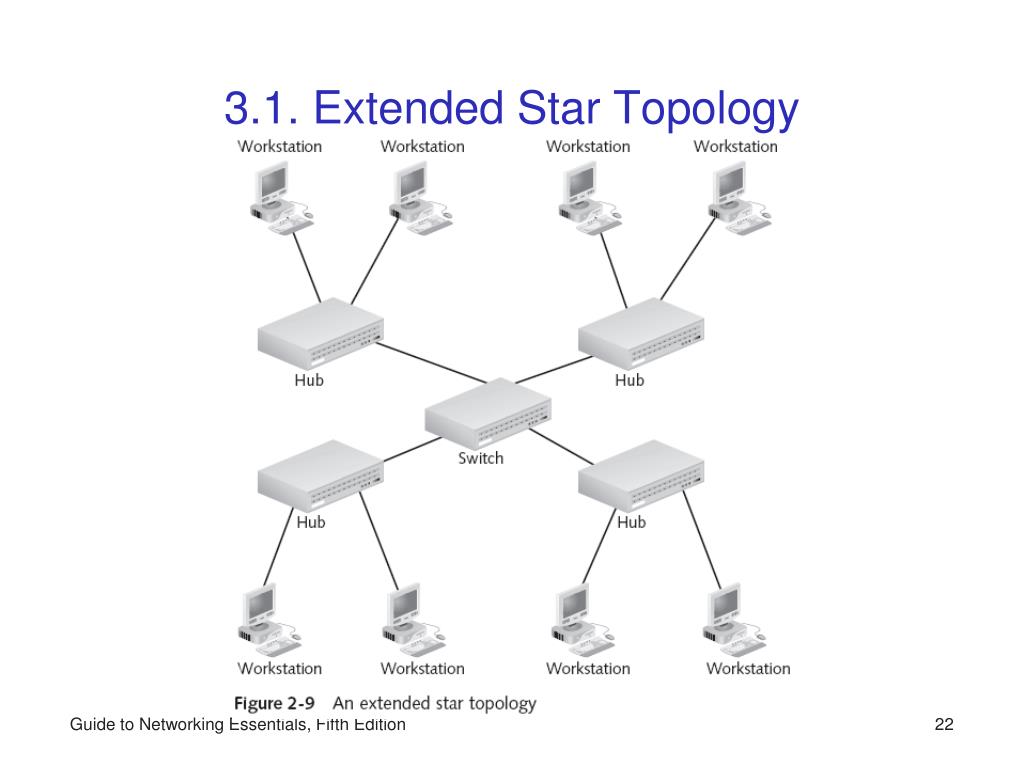
Look—if you’ve ever set up a small office network or managed a home lab, you’ve likely run into the classic star topology. Every node connects to a central switch or hub. Simple, elegant, and terrifyingly easy to exploit if you leave the front door unlocked. I’ve spent over a decade watching people treat their central switch like it’s a fortress when in reality, it’s a glass house. Seriously. One misplaced VLAN tag or an open Telnet port, and an external intruder can walk right in. So let’s talk about how to actually lock it down.
I’m not going to throw a textbook at you. Instead, I’ll share the practical, battle-tested methods I’ve used to harden star networks—from small retail shops to enterprise branch offices. Because whether you’re using a dumb switch (please don’t) or a managed switch with all the bells and whistles, the core principles remain the same. Let’s get into it.
Why a Star Topology Is a Magnet for External Threats
You’d think a single point of failure would be obvious. But the real danger isn’t the switch itself—it’s the fact that every packet from every device passes through that central node. An external intruder who compromises the switch can see everything: traffic patterns, device types, unencrypted credentials, you name it. It’s a big deal.
Think of it like a hotel lobby. The front desk (your switch) controls access to every room. If a bad actor slips past the concierge, they can eavesdrop on conversations, unlock doors, or even reroute guests to a fake room. In network terms, that means ARP spoofing, MAC flooding, or rogue DHCP attacks become trivially easy.
And here’s the kicker: many star networks are deployed without any segmentation. All devices, from your CEO’s laptop to an IoT thermostat, sit in the same broadcast domain. That’s a recipe for disaster. But don’t worry—we can fix this.
The First Line of Defense: Physical and Port Security
You can’t secure a network you can’t touch. No, really. I’ve seen entire star topology networks go down because someone plugged a malicious Raspberry Pi into an open wall jack. The fix is simple but often ignored:
- Disable unused ports on your managed switch. Every live port is a potential entry point. - Enable MAC address filtering at the port level. Only known devices get access. - Use 802.1X authentication for wired ports. This way, a device must present valid credentials before the switch even opens the door.
Sure, these steps won’t stop a determined hacker with physical access to your wiring closet. But for an external intruder trying to break in remotely or via a rogue device plugged into an empty cubicle? It buys you time and logs.
Locking Down the Switch Configuration Itself
Here’s where most people mess up. They buy a managed switch, plug it in, and never change the default credentials. Honestly? That’s like leaving your car keys in the ignition with the engine running. An external intruder doesn’t need to be a genius—they just need to scan for default passwords.
Let’s be systematic about this:
1. Change default admin credentials immediately. Use a strong password manager. 2. Disable unused services like Telnet, HTTP, and SNMPv1/v2c. Use SSHv2 and HTTPS instead. 3. Set up an access control list (ACL) that restricts management access to specific IP addresses. Only your admin workstation should talk to the switch’s management VLAN. 4. Enable logging and send logs to a remote syslog server. Don’t rely on local logs—they can be wiped.
I once consulted for a company whose star network got pwned because they left SNMP read-write community strings set to “public.” The intruder downloaded the entire configuration in seconds. Don’t be that person.
VLAN Segmentation: The Star’s Hidden Superpower
A single broadcast domain is an intruder’s playground. But if you carve up your star topology into multiple VLANs, you force every packet to travel through a router or a Layer 3 switch. That gives you a chokepoint for security policies.
Here’s how I typically segment a star network:
- Management VLAN – for switches, APs, and admin workstations. No user devices allowed. - User VLAN – for employee laptops and desktops. - Guest VLAN – isolated from everything, with internet-only access. - IoT VLAN – smart devices, cameras, printers. They can only talk to specific servers.
This way, even if an external intruder compromises a user’s laptop, they can’t pivot to the management interface of your central switch. The VLANs are like airtight compartments on a ship. One springing a leak doesn’t sink the whole vessel.
Implementing Strong Access Controls at the Edge
The central switch is the heart, but the edge ports are the fingertips. Every device that plugs into your star network is a potential vector. So you need port security and dynamic ARP inspection (DAI).
- Port security limits the number of MAC addresses per port. If a bad actor tries to flood the switch with fake MACs, the port shuts down or goes into “restrict” mode. - DAI prevents ARP spoofing by validating ARP packets against a trusted binding table. This stops man-in-the-middle attacks dead in their tracks. - DHCP snooping works hand-in-hand with DAI. It filters out rogue DHCP servers and builds the binding table automatically.
Let me tell you a quick story. A friend ran a coffee shop with a free Wi-Fi star network. A customer plugged a tiny router into the wall, acting as a rogue DHCP server. Suddenly every device in the shop got a fake gateway IP. That’s external intrusion via internal means. DHCP snooping would have killed that instantly.
Securing Wireless Bridges and Remote Access
Not every star network is purely wired. Many have wireless access points (APs) hanging off the central switch. Those APs are external-facing by nature. An intruder can try to crack your Wi-Fi password or launch a deauthentication attack to sniff traffic.
Here’s what I recommend:
- Use WPA3 for all Wi-Fi networks. WPA2 is still around, but it’s vulnerable to KRACK attacks. - Isolate wireless traffic using a separate VLAN and guest isolation features. - If you allow remote workers to VPN into the star network, enforce multi-factor authentication (MFA) on the VPN gateway. The central switch should never be directly exposed to the internet.
And please, for the love of all that is holy, disable SSH password authentication on the switch itself. Use public key authentication instead. It’s not just for Linux nerds—it’s a necessity for any network device an intruder might target remotely.
Monitoring and Incident Response
You can have the best locks in the world, but if you never check the security camera footage, you’ll miss the burglar. Monitoring your star topology network is non-negotiable.
Set up a Network Intrusion Detection System (NIDS) like Snort or Suricata, and mirror the traffic from your central switch to the monitoring port (SPAN). This gives you a full view of all inbound and outbound traffic.
Look for anomalies: - Unusual outbound connections at 3 a.m. - Large amounts of broadcast traffic (could be a worm). - Multiple failed SSH login attempts from unknown IPs.
I usually configure automated alerts for these. When an alert triggers, I have a pre-defined response: shut down the port, log the event, and notify the admin via a messaging app. Speed matters—an external intruder can exfiltrate data in minutes.
Common Questions About Securing a Star Topology Network
#### What is the biggest risk in a star topology from an external perspective? The biggest risk is that the central switch becomes a single point of compromise. If an external intruder gains administrative access to the switch, they can control all traffic, inject malicious packets, or disable the entire network. That’s why securing the switch management interface is priority one.
#### Can I use a consumer-grade router as my central switch for a star topology? Technically yes, but it’s a bad idea for anything beyond a home setup. Consumer routers lack advanced security features like VLANs, 802.1X, port security, and deep logging. You’re much better off with a managed Layer 2 or Layer 3 switch from a reputable vendor.
#### How do VLANs help protect against external intruders? VLANs segment the network into separate logical domains. Even if an external intruder gains access to one VLAN—say the guest network—they cannot reach the management VLAN or internal servers without passing through a router with firewall policies. It’s like having separate buildings on the same campus with locked doors between them.
#### Should I disable STP (Spanning Tree Protocol) on my star topology switches? No, do not disable STP. While STP can be attacked via BPDU spoofing, you can mitigate that with BPDU guard on edge ports. Disabling STP opens you up to network loops and broadcast storms. Use root guard and loop guard as well to harden the topology.
#### Is MAC address filtering enough to stop external intruders? Not by itself. MAC addresses can be spoofed trivially. MAC filtering is a first layer, but you must combine it with 802.1X, DHCP snooping, and dynamic ARP inspection to create a layered defense. Otherwise, an intruder can just clone a legitimate MAC and walk right in.
That’s the real deal on securing a star topology network. It’s not rocket science—it’s just about applying consistent, layered controls at every point an external intruder might try to touch. Start with physical port security, lock down the switch, segment with VLANs, and monitor like a hawk. Do that, and your star network will shine without burning down.