
CDP vs LLDP: Which Discovery Protocol Should You Use
You’ve just plugged in a new switch, and now you’re staring at a console window wondering why your network topology looks like a tangled ball of yarn. Sound familiar? Look—every network engineer hits that moment where they need to figure out what’s connected to what. That's where discovery protocols step in. Cisco Discovery Protocol (CDP) and Link Layer Discovery Protocol (LLDP) are the two heavy hitters. But which one do you actually need? Honestly? It depends on your gear, your paranoia level, and whether you like vendor lock-in. Let me break this down with the kind of scars-only experience you can only get from 12 years in the trenches.
I’ve seen networks brought to their knees because someone blindly enabled CDP on a multi-vendor environment. I’ve also watched teams waste hours troubleshooting because they assumed LLDP would just work everywhere. It won’t. Not without some elbow grease. So grab a coffee, settle in, and let’s cut through the marketing fluff. This isn’t a textbook—it’s the real deal.
What Exactly Are CDP and LLDP? (And Why Should You Care?)
CDP: The Cisco Original That Refuses to Die
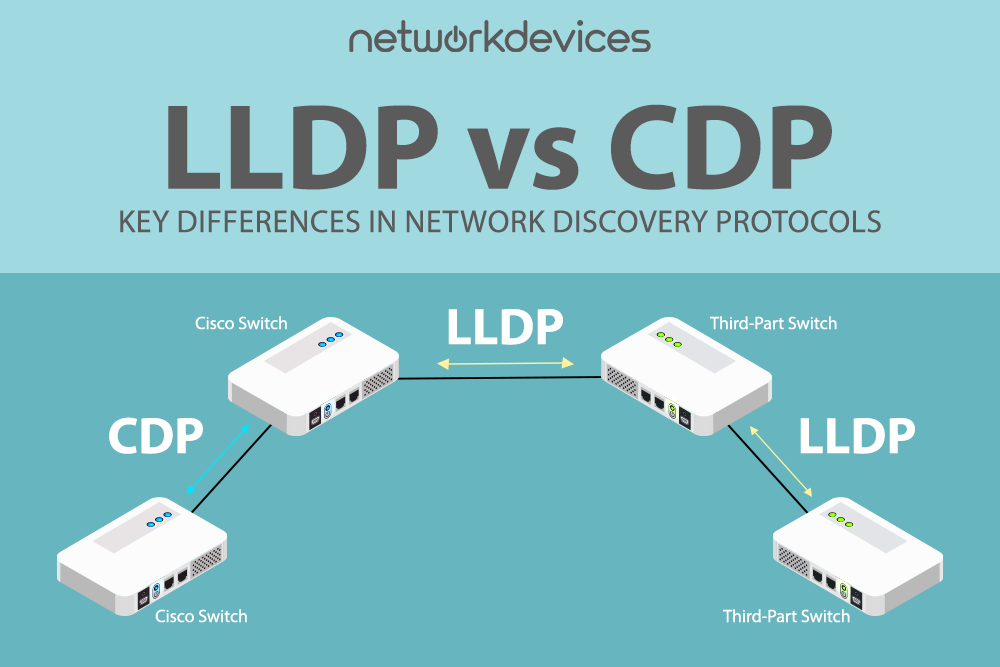
Cisco created CDP back in the early 90s when the internet still sounded like a modem screeching. It's a proprietary Layer 2 protocol that runs on all Cisco devices—routers, switches, firewalls, even IP phones. Seriously, if it has a Cisco logo and an ethernet port, CDP is probably chattering away by default. It sends out advertisements every 60 seconds (by default) telling neighboring devices: “Hey, I’m a Catalyst 3850, my IP is 10.1.1.1, and I’m running IOS XE 16.9.”
Here’s the kicker: because it’s proprietary, only Cisco gear can fully understand those announcements. Put a Juniper switch next to a Cisco switch, and CDP becomes a one-sided conversation. The Juniper box catches the packets, shrugs, and drops them. You get zero topology information. That’s a problem if you’re not in a pure-Cisco shop. And let’s be real—who is these days?
LLDP: The Open Standard That Tries to Play Nice With Everyone
LLDP is the IEEE 802.1AB standard. Think of it as the diplomatic cousin of CDP. It’s designed so that any vendor—Cisco, Juniper, Arista, HP, you name it—can talk the same language. LLDP sends advertisements (once every 30 seconds by default) that include device ID, port ID, system name, capabilities, and even management addresses. It’s verbose, but it’s also flexible.
The beauty of LLDP? It’s not tied to any single manufacturer. If you’ve got a mixed-vendor network (and if you don’t, I envy your budget), LLDP is your only reliable choice for end-to-end visibility. But here’s the catch: LLDP is optional on Cisco gear. You have to explicitly enable it. And some older Cisco switches still default to CDP-only, which catches people off guard. “I turned on LLDP, why isn’t it working?” Because you also need to disable CDP on that port, or the two protocols can step on each other. Yeah, it’s a thing.
When CDP Wins (and When It Backfires)
Pure Cisco Shops: CDP Is Your Best Friend
If your entire data center is Cisco from top to bottom—routers, switches, wireless controllers, IP phones—then stick with CDP. It’s lighter than LLDP, uses fewer CPU cycles, and integrates deeply with Cisco-specific features like Voice VLAN, Power over Ethernet negotiation, and even StackWise. I’ve seen networks with thousands of Cisco switches where CDP discovers the entire topology in seconds. No extra configuration, no fuss.
But here’s the danger: CDP sends information in plain text. Any device within broadcast range can listen in. In a secure environment, you might want to disable CDP on untrusted ports. I’ve walked into audits where the compliance team nearly had a heart attack because CDP was leaking IP addresses to every cubicle. So yes, CDP is fast and easy. But it’s about as secure as leaving your front door unlocked.
Mixed-Vendor Networks: CDP Will Make You Cry
Imagine this: You’ve got a core Cisco switch connected to a Juniper EX series. You enable CDP on the Cisco side, and the Juniper just ignores it. Now you’re manually logging into both devices to map connections. It’s 2025. Nobody has time for that. CDP is useless in multi-vendor environments unless you’re using it only for Cisco-to-Cisco links and then doing something creative like bridging with LLDP on the same port. Spoiler: that’s messy and prone to errors.
I once spent three hours troubleshooting a link flap that turned out to be CDP and LLDP fighting over the same interface. The Cisco switch was sending CDP, the Arista switch was sending LLDP, and the poor interface was drowning in management frames. Eventually, both protocols got disabled, and the link stabilized. Moral of the story: pick one protocol per interface. Don’t mix them unless you really know what you’re doing.
Why LLDP Is the Future (But Has Its Own Quirks)
Vendor Agnostic and Extensible
LLDP isn’t just for topology discovery. It’s extensible through TLVs (Type-Length-Value fields). You can craft custom TLVs to carry almost anything—battery levels on wireless APs, environmental sensor data, even inventory information. That flexibility makes LLDP the go-to for modern DCIM (Data Center Infrastructure Management) tools. If you’re using a network monitoring system like SolarWinds or PRTG, they almost certainly parse LLDP data better than CDP.
But here’s the trade-off: LLDP is more overhead. Each packet is bigger, and the default timer is faster than CDP’s (30 seconds vs 60 seconds). On a network with thousands of devices, that adds up. I’ve seen a busy distribution switch spend 2-3% of its CPU just processing LLDP frames. That’s not huge, but on older hardware, it can push you over the edge. So if you’re running 2960s from 2008, maybe think twice before blasting LLDP everywhere.
Configuration Gotchas That Will Trip You Up
LLDP on Cisco requires global and interface-level commands. Miss one step, and it doesn’t work. For example, on an IOS switch:
Simple, right? But if you forget `lldp run` globally, the interface commands do nothing. I can’t count how many times I’ve seen configs with `lldp transmit` on an interface but no global enable. And then the engineer swears LLDP is broken. It’s not broken—you just missed a line.lldp run interface GigabitEthernet0/1 lldp transmit lldp receiveAlso, LLDP doesn’t handle Voice VLAN the same way CDP does. Cisco IP phones rely on CDP to negotiate the Voice VLAN ID. If you disable CDP and use LLDP instead, you need LLDP-MED (Media Endpoint Discovery), which is an extension that many vendors support but not all. Test it before you roll it out. I’ve seen entire VoIP deployments fail because someone assumed LLDP-MED was equivalent to CDP Voice VLAN. It’s close, but not identical.
CDP vs LLDP: A Side-by-Side Comparison You Can Actually Use
Let’s put the two protocols head-to-head. I’ve seen both in action, and here’s the honest breakdown:
- Standard: CDP is proprietary (Cisco). LLDP is IEEE 802.1AB (open). If you care about interoperability, LLDP wins by a mile.
- Default Behavior: CDP is enabled by default on all Cisco interfaces. LLDP is disabled globally on Cisco and must be enabled manually. Surprise factor: low for CDP, high for LLDP.
- Security: Both send plain-text data. Neither is encrypted. But CDP has a larger attack surface because it’s on by default. I recommend disabling both on ports facing end users or the internet.
- CPU Impact: LLDP uses slightly more CPU due to larger packets and faster timers. On modern hardware, it’s negligible. On legacy gear, it matters.
- Extended Features: CDP integrates natively with Cisco IP phones, PoE, and StackWise. LLDP has LLDP-MED for voice and custom TLVs for DCIM. Your mileage varies.
- Vendor Support: CDP works only on Cisco (and a few third-party devices that spoof it). LLDP works on almost every managed switch, router, and server. Period.
Practical Recommendations Based on Real-World Scenarios
Scenario 1: All-Cisco Data Center with IP Phones
Use CDP. It’s simpler, requires zero extra config, and handles Voice VLAN and PoE negotiation flawlessly. Don’t waste time enabling LLDP unless you have a specific management tool that demands it. Just remember to disable CDP on public-facing or untrusted ports.Scenario 2: Mixed-Vendor Environment (Cisco, Juniper, Arista, HP)
Enable LLDP globally on every device. Disable CDP on all inter-vendor links (Cisco tends to keep CDP running by default, which causes confusion). For Cisco-to-Cisco links, you can keep both, but make sure they’re not fighting—set the LLDP timer to 60 seconds to match CDP’s cadence.Scenario 3: Highly Secure Network (PCI-DSS, HIPAA, etc.)
Disable both CDP and LLDP on all edge ports. Seriously. Any discovery protocol is a reconnaissance tool for attackers. Use authenticated SNMP or a dedicated out-of-band management network instead. I’ve had security teams mandate that every port be “discovery-free” to pass audits. It’s a pain, but it’s the safest route.Scenario 4: Data Center with DCIM Tools
LLDP wins here, hands down. Most DCIM systems rely on LLDP TLVs to auto-populate rack diagrams and cable maps. CDP data is less rich and less standard. You’ll spend more time parsing CDP output than actually managing your infrastructure. Do yourself a favor and go LLDP-only for the DCIM layer.
Common Questions About CDP vs LLDP: Which Discovery Protocol Should You Use
Can I run CDP and LLDP on the same interface?
Technically, yes. But practically, it’s a bad idea. Both protocols send management frames, and they can interfere with each other under heavy load. I’ve seen interfaces flap when both are enabled on older switches. If you must run both, stagger the timers (e.g., CDP every 60 seconds, LLDP every 90 seconds) and only do it on uplinks where you need dual visibility. Avoid it on access ports.
Does LLDP work with Cisco IP phones?
It can, but only if you enable LLDP-MED (Media Endpoint Discovery). Even then, some older Cisco phones (like the 7940/7960 series) only understand CDP for Voice VLAN. For modern 88xx series phones, LLDP-MED works fine. Test a pilot before you roll out. Trust me—voicemail blitzes aren’t fun.
Which protocol has less security risk?
They’re both equally insecure because they send unencrypted data. However, CDP is riskier because it’s on by default on millions of devices. Many engineers forget to disable it. LLDP requires intentional configuration, so it’s less likely to leak data accidentally. The best practice? Disable both on untrusted ports and use an out-of-band management network.
Do I need to disable CDP if I enable LLDP on a Cisco switch?
Not automatically, but you should for consistency. If you have a mixed-vendor link, the neighbor device won’t understand CDP anyway. Leaving CDP on just wastes CPU cycles. Use the command `no cdp enable` on those interfaces. For a pure Cisco-to-Cisco link, you can keep CDP and also enable LLDP if you need both—but again, watch for performance issues.
Which protocol should I use for virtual switches (VMware vSwitch, etc.)?
Virtual switches typically use LLDP because it’s the open standard. VMware vSphere supports LLDP on distributed switches. CDP is less common in virtual environments. Stick with LLDP for host-to-physical-switch discovery. It’s what the hypervisor vendors expect.
That’s the long and short of it. I’ve deployed both protocols countless times, and the answer always comes down to one thing: what gear are you connecting and what do you need to know. CDP is the comfortable old boot you’ve worn for years. LLDP is the new hiking shoe that fits everyone’s foot. Neither is perfect, but knowing their quirks will keep you out of trouble. Now go disable CDP on that edge port before your security team finds it.