
Comparing Motion Profiles: PTP vs Continuous Path
Let me start with a confession. I’ve spent over a decade elbow-deep in automation systems, and I still see engineers make the same mistake: picking a motion profile based on what feels right rather than what the application actually demands. It’s not their fault, really. The difference between PTP (Point-to-Point) and Continuous Path (CP) can feel like splitting hairs on a theoretical diagram. But in the real world—on a factory floor with a six-axis arm hauling a 50-kg payload—that “hair” is the difference between a flawless 10,000-cycle run and a catastrophic crash that costs you a shift.
So, which one do you choose? The short answer is: it depends. But I’m not here to give you a short answer. I’m here to make sure you never confuse the two again.
Why Your Motion Profile Choice Actually Matters (A Lot)
If you’ve ever watched a robot move, you’ve seen the result of a motion profile. You just didn’t know you were looking at one. That smooth, almost lazy arc when a robot arm picks a part and places it gently into a press? That’s Continuous Path. The aggressive, fastest-possible sprint between two points—where the arm jerks to a stop, reorients, and then shoots off again? That’s Point-to-Point. Both get the job done. But they do it in fundamentally different ways, and understanding that difference is what separates a competent programmer from someone who just gets lucky.
What’s Actually Happening Under the Hood?
Let’s get technical for a second—but not too technical. I promise.
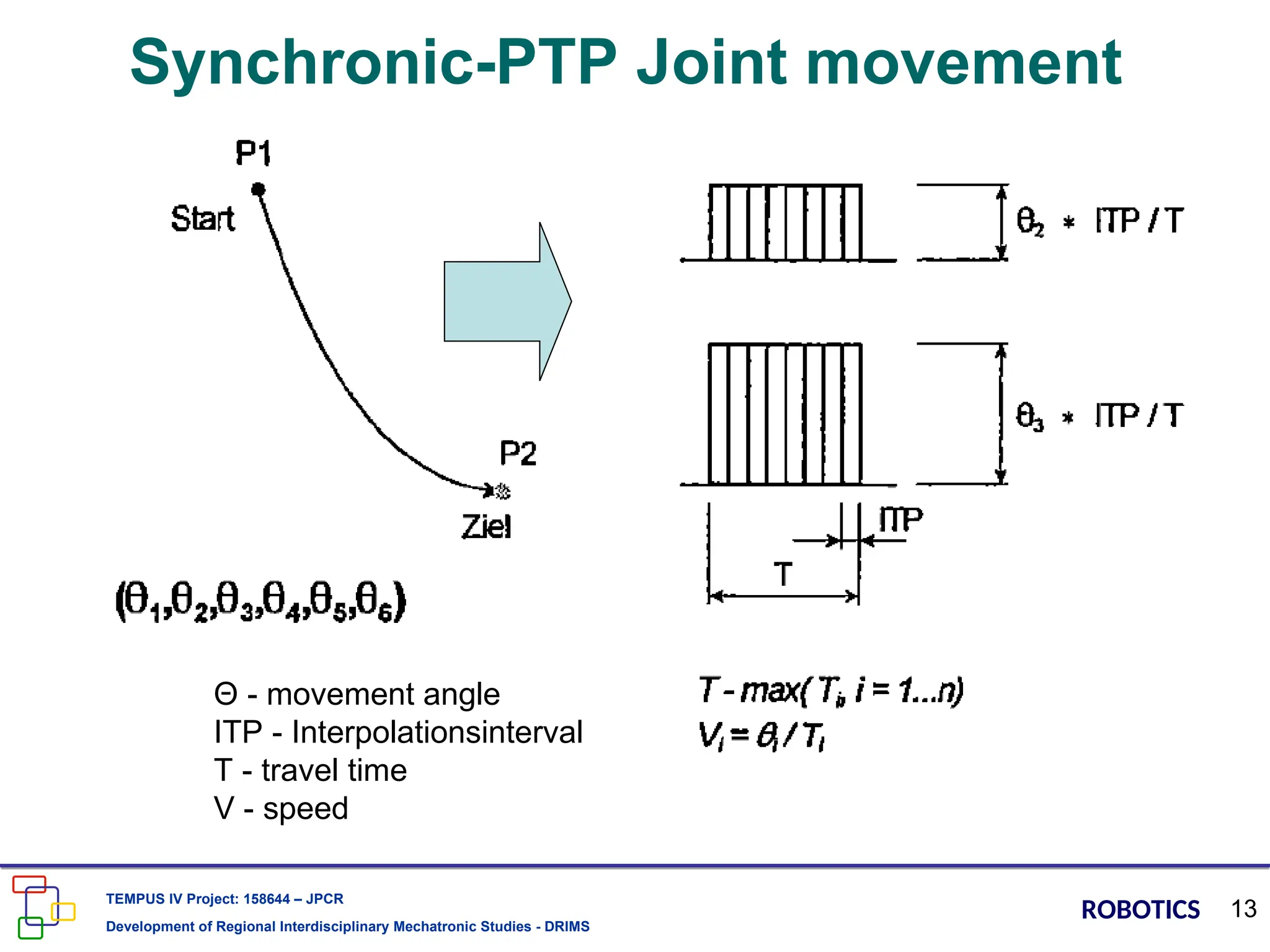
When you command a PTP move, the controller doesn’t care about the path between the start and end. It only cares about getting each axis to its target position. Fast. Seriously, that’s it. The controller calculates the fastest possible acceleration, slew speed, and deceleration for each joint individually. The result? Each axis finishes its move at exactly the same time, but the tool tip? It takes a wild, unconstrained path through space. It’s efficient, but it’s unpredictable.
Continuous Path, on the other hand, forces the controller to compute a coordinated trajectory for the tool center point (TCP). Every joint is constrained to move in such a way that the TCP follows a defined geometric path—usually a straight line or a smooth arc. This takes more computational horsepower and often results in slower cycle times, but you get absolute certainty about where the tool is at every moment.
The Ugly Side of PTP: Jerk and Overshoot
Look—PTP is fast. No one argues that. But speed comes at a cost.
- Uncontrolled tool orientation: The arm can twist, flip, or rotate in ways you didn’t anticipate. - Higher jerk forces: Sudden changes in acceleration can shake loose delicate grippers or damage sensitive components. - Collision risk: Because the path is unconstrained, you have no guarantee the arm won’t clip a fixture or another machine.
I once watched a new operator program a PTP move to go from a conveyor belt to a CNC machine. It worked fine in simulation. On the real robot, the arm took a shortcut that swung the end-effector right through the safety light curtain. Production stopped for two hours while we re-taught the points with CP moves. Honestly? It was a rookie mistake. But it’s one I see all the time.
Continuous Path (CP): The Smooth Operator
If PTP is the sprinter, CP is the marathon runner. It’s not as flashy, but it’s reliable, predictable, and—most importantly—safe for your tooling and your parts.
The Secret Sauce: Trajectory Planning and Interpolation
Here’s where CP earns its keep. The controller uses interpolation algorithms—typically linear or circular—to ensure the TCP moves along a precise, mathematically defined path. The axes don’t just “go”; they dance in perfect synchronization. This means you can:
1. Weld a straight seam without oscillation. 2. Dispense adhesive along a curved surface with consistent bead width. 3. Pick a part from a tight nest without scraping the sides.
The trade-off? You lose speed. CP moves typically run slower because the controller has to continually recalculate the position of every joint at a high frequency (often 1 kHz or more). But for applications where path accuracy is non-negotiable, there’s no substitute.
The Trade-Off: Speed vs. Path Fidelity
This is the balancing act every integrator faces. Do you optimize for cycle time or precision? I’ll give you a rule of thumb I’ve used for years:
- PTP is your friend for point-to-point transfers where nothing exists in between the start and end zones. Think pick-and-place from a bin to a conveyor, or moving a part from Station A to Station B in free space. - CP is your weapon for any move that involves interaction with the environment. Welding, painting, gluing, machining, assembly—any operation where the tool must follow a specific contour or avoid obstacles.
One more thing: CP moves can get computationally expensive when you have many waypoints. I’ve seen controllers bog down with sinusoidal curves and complex splines. If your robot starts stuttering mid-path, you’ve probably overloaded the trajectory planner. Back off on the precision or simplify the path.
The Critical Differences You Can’t Ignore
Let’s lay it out plainly. Here’s a bullet-point breakdown of where these two motion profiles diverge:
- Path predictability: PTP = low; CP = high. - Speed: PTP = maximum axis velocity; CP = limited by TCP speed. - Tool orientation control: PTP = uncontrolled between points; CP = fully defined. - Computational load: PTP = minimal; CP = moderate to heavy. - Collision risk: PTP = higher; CP = lower (assuming proper waypoints).
When PTP Beats CP Every Time
You’ll hear some purists argue that CP should be used for everything. That’s wrong.
Imagine a robot that needs to pick a heavy casting from a shaker table and drop it into a quench tank. The space between those two points is empty. No obstacles. No fixtures. No delicate tooling. In that scenario, PTP is the obvious choice. It’s faster, it uses less processing power, and it doesn’t care about the path because nothing is in the way.
Another classic example: palletizing boxes. The robot grabs a box, lifts it to a clearance height, moves horizontally, and lowers it onto a pallet. The clearance height guarantees a safe zone. PTP all day, every day.
Real-World Catastrophes I’ve Witnessed (and What They Taught Me)
I’ll never forget a job at an automotive plant where a programmer used CP for a simple transfer move. The robot was sluggish. Cycle times were about 12% higher than spec. The production manager was screaming. I walked over, looked at the program, and changed three moves from CP to PTP. Cycle time dropped by 8%. The remaining 4% came from tuning accelerations.
On the flip side, I once saw a team try to use PTP for a seam-tracking weld on a truck chassis. The weld path was a gentle curve. The arm, programmed with PTP, took a series of straight-line shortcuts. The result? A weld that looked like a toddler’s drawing. They had to scrap the part.
Common Questions About Comparing Motion Profiles: PTP vs Continuous Path
Can I mix PTP and CP moves in the same program?
Absolutely. In fact, this is the standard approach for professional robot programming. Use PTP for fast transfers between safe zones, then switch to CP for precision work. Most industrial robot controllers handle this seamlessly. Just be aware of the transition—some controllers will briefly stop the arm between a PTP and a CP move to recalculate the trajectory, which can cause a small dwell time. Plan your program logic around that.
Does the type of robot affect the difference between PTP and CP?
Yes, but not as much as you might think. The core principles apply to all articulated robots, SCARA robots, and even Cartesian gantries. However, parallel-link robots (like delta robots) have very different dynamics. Their lightweight arms are optimized for high-speed PTP moves in pick-and-place applications. Forcing them into complex CP paths can introduce vibration and reduce accuracy. Know your robot's mechanical strengths before choosing the motion profile.
How do I know if my path accuracy is good enough for CP?
Check your robot's manufacturer's specifications for path repeatability. Typically, a good industrial robot will hold a CP path within ±0.1 mm to ±0.5 mm, depending on the model and the speed. If you need tighter accuracy than that, you may need to reduce the TCP velocity or use external sensors for closed-loop control. Also, watch out for backlash in the gearboxes—old or poorly maintained robots can drift off the path over long distances.
Is PTP ever more accurate than CP?
In terms of end-point positioning, yes. PTP is often more accurate at the target point because the controller focuses all its computational resources on getting each joint to the exact commanded position. CP sacrifices some endpoint precision to maintain path fidelity along the way. But that difference is usually negligible—within a few hundredths of a millimeter. For most applications, you won't notice it. For high-precision assembly, it might matter.
Can I use CP to avoid obstacles even if I don't need a precise path?
Yes, but you're wasting performance. If you just need to avoid a single obstacle, you're better off teaching an intermediate via point and using PTP. That will keep your cycle time low and still guarantee clearance. CP should be reserved for situations where the path itself is the functional requirement—not just a safety measure. Overusing CP is one of the most common performance killers I see on the floor.
So next time you’re staring at a teach pendant, deciding between a PTP and a CP command, think about what actually happens between the start and the end. Don’t just pick the one you always use. Pick the one your application demands. It’s that simple.
Math expression renderer, plots, unit converter, equation solver, complex numbers,. The math calculator will evaluate your problem down to a final solution. You can also add, subtraction, multiply, and divide and complete any arithmetic. Solve advanced problems in physics, mathematics and engineering. Online decimal calculator to find sum, difference and products of numbers. This versatile integer calculator is designed for seamlessly. It shows what to do first, how each step builds on the last, and how each move brings you closer to the. In an amazing mathematical puzzle, letters and symbols take place of unknown numbers. Free online scientific notation calculator. Free online math calculator to add, subtract, multiply and divide positive and negative numbers.