
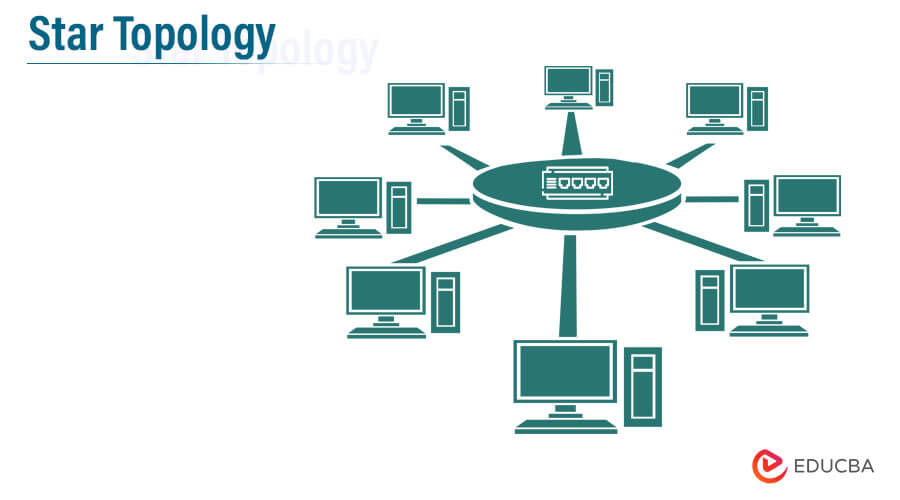
Why Star Networks Fail in Large Scale Businesses
You've just finished wiring up a brand new star network for your mid-sized office. It feels clean, it feels right, and honestly? It works perfectly. Every device connects to a single central switch, traffic flows beautifully, and your users are happy. Now fast forward two years. Your company has tripled in size, you've got five hundred devices hammering that same central switch, and you're waking up at 3 AM to angry calls from the CFO because the entire finance department can't send emails.
I've seen this exact scenario play out more times than I can count. The star network topology—that elegant hub-and-spoke design we all learned in networking 101—is a ticking time bomb for large scale operations. It works wonders for a small office, a home setup, or even a single department. But when you scale it? It doesn't just struggle. It fails. Spectacularly. And usually at the worst possible moment.
Look, I'm not here to trash the star topology entirely. It's simple, it's cheap, and it's easy to troubleshoot. Those are real advantages. But they come with a price tag that most businesses don't realize they're paying until it's too late. Let me walk you through exactly why this happens, what the warning signs look like, and what you should do about it.
The Deceptive Simplicity of the Star
Here's the thing about star networks: they trick you into thinking network design is easy. You buy one big switch, plug everything into it, and call it a day. No complex routing protocols, no messy cable runs between floors, no agonizing over link aggregation. It feels like a win. And for a while, it is.
Why It Feels So Right at First
The initial deployment is absurdly fast. I've rolled out star networks in under an hour for a twenty-person team. You drop a switch in a closet, run cables to each desk, configure a couple of VLANs, and boom—you're done. Troubleshooting is equally straightforward. A user can't connect? You check the port status on the switch. Everything lights up green? It's their device, not the network. End of story.
The cost structure also looks great on paper. One high-end switch costs less than a dozen smaller switches plus the fiber runs to connect them. Finance loves that spreadsheet. Your manager loves the simplicity. Everyone high-fives, and you move on to the next project.
But here's what nobody tells you in that first meeting: you are building a single point of failure the size of a refrigerator. That one switch becomes the heart of your entire operation. If it hiccups, the whole business hiccups. If it dies, the whole business dies. And when you start adding users, devices, and bandwidth-hungry applications, that heart starts showing signs of strain that no amount of configuration tweaking can fix.
The Moment of Truth
The moment of truth usually arrives around the two-hundred-device mark. Suddenly, that switch that handled everything effortlessly starts to choke. Ports drop unexpectedly. Latency spikes during peak hours. The management interface becomes sluggish. You check the CPU utilization and it's sitting at ninety percent during lunch. Your first instinct is to blame the switch vendor, maybe upgrade the hardware. But the problem isn't the hardware. It's the topology. You're asking a single device to handle the entire traffic load of a growing organization, and physics is not on your side.
I once consulted for a company that had a single Cisco 4500X switch handling their entire corporate network. Six hundred users, dozens of servers, VoIP phones, video conferencing, the works. The switch was running hot enough to fry an egg. They had deployed it three years earlier and never looked back. When I asked about redundancy, they literally laughed. That laughter stopped the day the power supply failed and the entire company went dark for six hours. The cost of that downtime? Somewhere north of two hundred thousand dollars in lost productivity and missed deals. The cost of a second switch? About twelve grand.
Bottlenecks and Bandwidth Wars
Let's talk about the real pain point: bandwidth concentration. In a star network, every single packet has to pass through that central switch. Every email, every file transfer, every streaming video call, every database query. It doesn't matter if two devices are sitting right next to each other. Their traffic still has to travel up to the switch and back down.
The Oversubscription Nightmare
Oversubscription is a fancy networking term for a simple problem: you have more devices wanting to send data than your switch can handle at once. In a well-designed network, you plan for this. In a star network, you just hope it doesn't happen. And it always happens.
Think of it like a highway. A star network is a single on-ramp feeding onto a single highway where every car has to merge. Now imagine that highway is also the only road for local traffic, commuters, trucking, and emergency vehicles. That's your switch. Everything converges on the same fabric, and the result is congestion, packet loss, and retransmissions that make everything feel slow.
The math is brutal. A typical 48-port gigabit switch has a backplane capacity that can handle maybe 32 or 40 ports running at full speed simultaneously. When you have 200 devices, you're oversubscribed by a factor of four or five to one. And modern applications aren't kind about this. Video calls, cloud backups, and real-time collaboration tools will happily consume every bit of bandwidth you give them.
Latency Creep
Latency is the silent killer of network performance. It doesn't crash your network. It just makes everything feel sluggish and unresponsive. Users start complaining that the VPN is slow. They blame the internet, blame the application, blame their laptop. But the real culprit is that single switch drowning in traffic.
Here's a concrete example that still makes me wince. I worked with a logistics company that had a star network connecting their warehouse, their office, and their server room. The switch was in the server room, which meant warehouse workers scanning barcodes had to send their data all the way across the building, through the switch, and back to the server. The round trip was milliseconds, but when you're scanning hundreds of packages per hour, those milliseconds add up. The warehouse staff were standing around waiting for scans to register. Nobody connected the dots until we ran a traceroute and saw the unnecessary hop.
The fix was simple: a local switch in the warehouse with a direct fiber link to the server room. But that's not a star network anymore, is it? That's a distributed design. And that's the whole point.
Scalability and the Cost Explosion
People think star networks are cheap. And they are, initially. But scalability has a nasty habit of turning cheap solutions into expensive nightmares. The cost of a star network doesn't scale linearly with the number of devices. It scales exponentially, and not in a way that shows up on your budget spreadsheet right away.
Wiring Closet Apocalypse
Every new desk means another cable running back to the central switch. That sounds fine until your office spans multiple floors, multiple buildings, or multiple cities. Suddenly you're running two-hundred-foot cables through drop ceilings, drilling through firewalls, and installing cable trays that look like industrial art projects. The cost of cabling alone can eclipse the cost of the switches themselves.
I've seen offices where the cable run from a desk to the switch is over three hundred feet. You know what happens with runs that long? Signal degradation. You have to drop from gigabit to 100 megabit just to maintain a stable connection. That's a performance hit that users feel immediately, but nobody thinks to blame the topology. They blame the ISP, blame the cloud, blame anything except the decision to put one switch in a closet and call it a day.
And then there's the physical mess. Cable management becomes a nightmare. You end up with rats nests of Ethernet cables that are impossible to trace, impossible to maintain, and impossible to upgrade. Every equipment failure becomes a major project because you have to untangle a dozen cables just to swap a switch.
The Upgrade Trap
Upgrading a star network is where the real pain lives. When you need more ports, you don't just add another switch—not easily, anyway. You have to replace the central switch with a larger model or stack multiple switches together. Both options are expensive, disruptive, and temporary fixes at best.
Stacking switches creates its own set of problems. Stacking cables are proprietary, finicky, and prone to failure. I've seen a single loose stacking cable take down an entire stack of eight switches. The network team spent four hours trying to figure out why half the ports were unreachable. The culprit? A cable that wasn't fully seated. That's not a design failure. That's a reliability failure that you don't have with distributed topologies.
The bigger issue is that every upgrade leads to downtime. You can't replace a central switch without taking the network offline. Even if you have redundant power supplies and management modules, the switch itself is a single device. When it's time to swap it, you schedule a maintenance window, you call everyone in, and you cross your fingers that the new switch configures correctly. If it doesn't, you're rolling back to a broken switch while the entire company waits.
The Domino Effect of a Single Point of Failure
This is the big one, and it deserves its own spotlight. A star network has exactly one point where everything can go wrong. That central switch or router is the lynchpin of your entire operation. And when it fails, it doesn't fail gracefully. It fails hard.
The Great Silence
I remember a Friday afternoon call from a retail chain. Their entire payment system was down. Every store, every register, every credit card transaction—gone. The cause? A single switch in their data center had developed a bad power supply. Not a complete failure, mind you. Just a bad power supply that caused intermittent resets. Each reset took down the entire network for thirty seconds. Thirty seconds of silence. Thirty seconds of angry customers walking out of stores.
A distributed network would have had failover paths. Traffic would have rerouted automatically. Customers would have swiped their cards and never known anything was wrong. But in a star network, there is no reroute. There is no failover. There is only the switch, and when it blinks, the whole business blinks with it.
The worst part? No one could fix it remotely. Because the switch was the only point of management access. The network team couldn't SSH into anything because the switch was the thing they needed to SSH into. They had to drive to the data center, swap the power supply, and bring everything back up manually. That's hours of downtime for a problem that a redundant design would have solved in milliseconds.
Recovery Time Objective (RTO) Nightmares
Let's talk about recovery. In a star network, your recovery time is directly tied to how fast you can reach that central switch and fix it. If the switch is in a locked closet in the same building, maybe thirty minutes. If it's in a different city, you're looking at hours. If the switch is completely dead and you don't have a spare on hand, you're looking at days while you wait for a replacement to ship.
Compare that to a mesh or partial-mesh topology where you have multiple paths between devices. In those designs, a switch failure might cause a brief routing convergence, but traffic keeps flowing. Users might notice a slight performance dip while the network rebalances. They don't go home early. They don't complain to the CEO. The network does its job and stays invisible.
The RTO for a well-designed distributed network is measured in seconds. The RTO for a star network is measured in hours. That difference is the difference between a minor incident and a major business disruption. And in large scale businesses, major disruptions have consequences that go far beyond the IT budget.
Security and the 'Fan-Out' Problem
Security in a star network is deceptively simple until it's not. You have one central point where you can apply policies, monitor traffic, and enforce segmentation. That sounds great. But that central point is also a single vantage point that, if compromised, gives an attacker access to everything.
The Broadcast Domain
Every device connected to the star is in the same broadcast domain unless you carefully segment them with VLANs. And even with VLANs, traffic between VLANs has to pass through that central switch’s router interface. That creates a choke point for both performance and security.
I've seen attackers exploit this exact design flaw. A compromised workstation on a star network can generate a broadcast storm that saturates the entire switch fabric. Every device feels the impact. Every user gets knocked offline. And because the switch is the only control point, you can't isolate the compromised device without taking down the rest of the network to reconfigure it.
Worse, if an attacker gains access to the management interface of that central switch, they own your entire network. In a distributed design, compromising one switch gives you access to only that segment. You have to compromise multiple devices to control the whole network. The star network hands the keys to the kingdom on a silver platter.
Physical Security Blind Spots
The physical security of a star network is also a headache. Every cable running back to the central switch is a potential tap point. In a large office, you have cables snaking through ceilings, walls, and common areas. Anyone with physical access to those cables can potentially intercept traffic. With a distributed design, you run fewer long cables, and those cables tend to be in controlled environments like conduit or dedicated cable trays.
And let's not forget the central switch itself. That device is a physical target. Someone with malicious intent or just poor intentions can unplug a power cord, cut a cable, or simply bump the switch in a way that disrupts traffic. In a star network, that single act of clumsiness or malice takes down everything. No redundancy. No failover. Just a dark office and a lot of angry users.
Common Questions About Why Star Networks Fail in Large Scale Businesses
What exactly is the single point of failure in a star network?
The single point of failure is the central switch, router, or hub that all devices connect to. If that device fails, every device loses network connectivity. There's no alternative path for traffic because all data must pass through that central point. Even with redundant power supplies or management modules, the device itself is the bottleneck. A distributed or mesh topology eliminates this by providing multiple paths between devices.
Can a star network ever work for a large business?
Yes, but only if you design it correctly. You can use a star topology for specific segments within a larger distributed network. For example, a single department or floor might use a star topology internally, but the overall campus or building network uses a hierarchical design with redundancy at the core and distribution layers. The problem arises when you rely on a single star for the entire organization. That’s when the risks become unacceptable.
What are the alternatives to a star network for large scale deployments?
The most common alternatives are the mesh topology, the tree topology, and the leaf-spine architecture. Mesh topologies provide full redundancy but require more cabling and configuration. Tree topologies combine multiple star networks in a hierarchical structure, which is what most enterprise networks use today. Leaf-spine architectures are popular in data centers because they provide consistent latency and high bandwidth between any two devices. The key is to avoid putting all your traffic through a single device.
How much does downtime from a star network failure actually cost?
The cost varies widely depending on the industry, but the numbers are sobering. For a mid-sized company with 500 users, a single hour of network downtime can cost anywhere from $10,000 to $100,000 or more in lost productivity, missed sales, and reputation damage. A full-day outage can easily run into the hundreds of thousands. Compare that to the cost of adding redundant switches and designing a resilient topology, which might be a one-time investment of $10,000 to $50,000. The math is brutally clear.
Is a star network easier to manage than other topologies?
Yes, it’s easier to manage when the network is small. One device to configure, one place to monitor, one set of logs to review. That simplicity is a genuine advantage for small teams or small offices. But as the network grows, that single device becomes a management nightmare. You end up dealing with increasing complexity in VLANs, ACLs, and traffic policies just to keep things running. At scale, the simplicity becomes a liability because you’re forced to work around the limitations of a single control point. Distributed networks require more upfront planning, but they scale far more gracefully.
Final Thoughts
Look, I get the appeal of the star network. It's clean, it's fast to deploy, and it makes you look like a hero in the first month. But that hero status evaporates the first time the central switch fails. Large scale businesses cannot afford the fragility, the single points of failure, the bandwidth bottlenecks, and the security risks that come with this topology. If you're running a star network at scale right now, you're not running a network. You're running a gamble. And the odds are not in your favor. Start planning your migration to a distributed design today, before the next failure takes you down. Your users will thank you. Your CFO will thank you. And you'll sleep a lot better at night.