
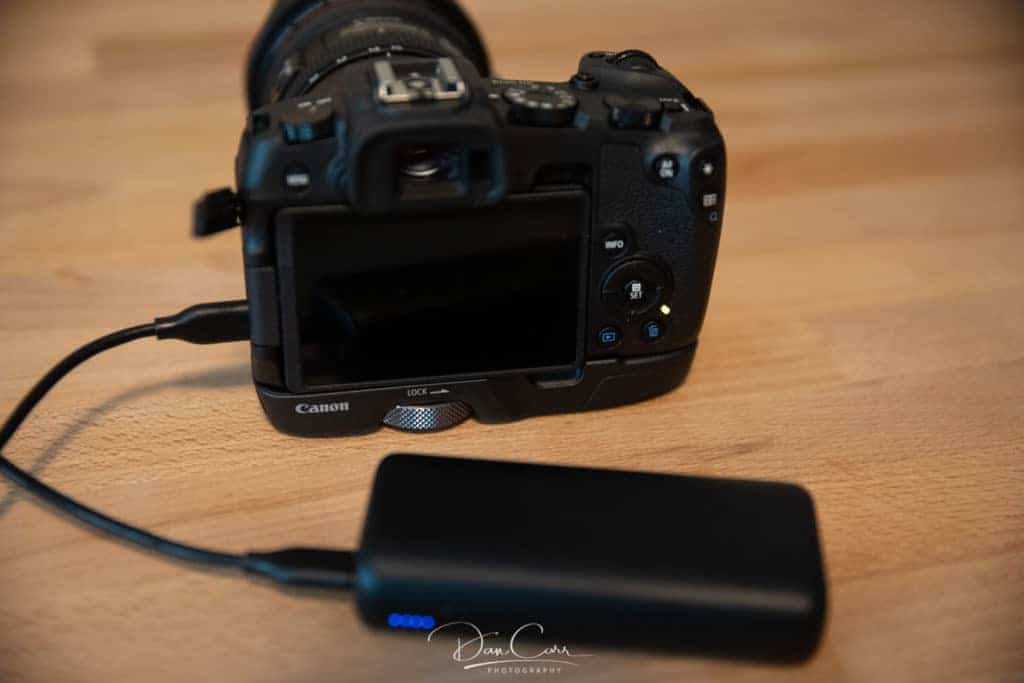
How to Charge the Canon EOS R50 Battery via USB-C
Let me paint you a picture. You're at a coffee shop, you've got the shot lined up, and your R50 gives you that dreaded low-battery blink. You reach for your spare LP-E17, but it's dead too. Then you remember—that little USB-C port on the side. Can you just plug it in and keep shooting?
Yes. But it's not quite that simple. I've been working with Canon's mirrorless line since the original EOS M days, and the R50's USB-C charging behavior still trips up even experienced shooters. Let's clear up the confusion once and for all.
Why Most USB-C Charging Myths Are Wrong
The biggest misunderstanding I see online is people treating the Canon EOS R50 like a smartphone. You can't just grab any USB-C cable, plug it into your laptop, and expect a full charge in 45 minutes. The R50 uses a specific protocol called USB Power Delivery (PD). Without it, the camera either won't charge or trickles power so slowly you'd be better off napping.
The LP-E17 Battery and USB PD Compatibility
Here's the technical bit that actually matters. The LP-E17 battery inside your Canon EOS R50 has a nominal voltage of 7.2V. Standard USB-A ports output 5V. That voltage gap means your camera needs a smart charging circuit to step up the voltage. USB PD handles this negotiation automatically, but only if both the charger and the cable support it.
Seriously, the cable matters more than most people think. A cheap gas station USB-C cable might only handle 5V/2A. That's not enough to charge a 7.2V battery. You need a cable rated for at least 9V/3A output. Look for the USB PD logo on the connector or check the cable's spec sheet.
Why Canon Ships a Wall Charger (And Why You Might Still Want One)
Look—Canon knows you can charge via USB-C. They made that port standard on the R50 for a reason. But they also ship the LC-E17 charger in the box for a practical reason: speed.
When you use the dedicated charger, you get a full charge in roughly 2 hours. USB-C charging through the camera body? That takes closer to 3 to 4 hours, depending on your power source. The camera's internal charging circuit is deliberately conservative to protect the battery and the camera's electronics. It limits current draw to prevent overheating.
Honestly? If you're in a studio with wall power nearby, just use the dedicated charger. USB-C charging is for travel, field work, and emergencies.
The Right Way to Charge Your R50 via USB-C
Here's the step-by-step that I actually use when I'm on location. No guesswork, no internet myths.
Step 1: Confirm your power source supports USB PD. - Use a wall adapter rated for 18W or higher with USB PD. - Power banks must support USB PD output. Standard power banks won't work. - Laptop USB-C ports vary. My MacBook Pro works fine. My old ThinkPad does not.
Step 2: Use a certified USB-C to USB-C cable. - Don't use USB-A to USB-C cables for charging the camera. They usually don't work. - The cable should be at least 3A rated. Thicker cables often handle higher wattage better.
Step 3: Turn the camera off. - This is the most important step. The Canon EOS R50 does NOT charge while powered on via USB-C. - You'll see a steady orange LED near the USB port if charging is active. - A blinking orange LED means something is wrong—usually a power source issue.
Step 4: Wait. And then wait some more. - The R50 charges slower than your phone. That's by design. - Check the battery level after an hour. If it hasn't moved, your power source is incompatible.
Choosing the Right Power Bank for the R50
I've tested maybe a dozen power banks with the Canon EOS R50 over the years. The ones that work best have a few things in common:
- They output 20W or more via USB-C PD. - They have a dedicated USB-C PD port (not shared with a data port). - They work with Anker, RAVPower, and Belkin units reliably. Off-brand banks often fail.
Don't fall for the "high capacity, low price" trap. A 10,000mAh power bank that doesn't support PD is useless for your R50. Spend the extra $15. It's worth it when you're on a week-long hike with no wall power.
What the Orange LED Actually Means
I can't tell you how many times I've seen people panic over this. The orange LED near the USB port isn't a fancy indicator—it's straightforward:
- Solid orange: Charging normally. - Blinking orange: Fault detected. Usually a power source or cable issue. - No light: Camera is off, but nothing is happening. Likely a dead power source.
If you get a blinking light, unplug everything, wait 10 seconds, and try again with a different cable first. Cables fail more often than chargers.
What Happens When You Leave It Plugged In All Night?
This is where I get a little long-winded because the answer matters for battery health.
The Canon EOS R50 has built-in overcharge protection. Once the LP-E17 hits 100%, the camera stops drawing current. You can leave it plugged in overnight without damaging the battery. But—and this is a real "but"—heat is your enemy. If you're charging in a hot car or direct sunlight, the battery degrades faster.
I've seen R50 batteries swell after a year of constant USB-C charging in harsh conditions. The dedicated charger actually dissipates heat better. Something to think about if you shoot in the desert or humid environments.
Charge Management and Long-Term Battery Health
Lithium-ion batteries don't like being kept at 100% all the time. The Canon EOS R50 doesn't have a "charge limit to 80%" feature like some newer Sony cameras. If you're storing the camera for weeks, unplug it at around 50-60% charge. That's the sweet spot for Li-ion longevity.
For daily shooting? Charge it fully. Don't overthink it. The LP-E17 is a consumer-grade battery and costs around $50 to replace. I cycle through two or three per year with heavy use. They aren't built to last a decade.
Can You Shoot While Charging?
No. Plain and simple. The Canon EOS R50 disables USB-C power input when the camera is on. You cannot shoot tethered and charge simultaneously through the same port. If you need continuous power, you'd need a dummy battery setup with a DC coupler, which connects to a separate AC adapter.
I've seen forum posts claiming you can "trick" the camera by using a USB hub. Don't try it. You risk damaging the USB port or the camera's mainboard. Repairs aren't cheap.
Common Questions About Charging the Canon EOS R50 via USB-C
Can I use a regular phone charger for my R50?
Only if the charger supports USB-C Power Delivery. Many phone chargers use proprietary fast-charging protocols like Qualcomm Quick Charge or VOOC. Those don't work with the Canon EOS R50. Look for "USB PD" explicitly listed on the charger spec.
Does charging via USB-C damage the battery faster?
Not inherently, but heat from inefficient charging can degrade cells over time. The dedicated wall charger is slightly better for long-term health because it runs cooler. For occasional use, USB-C charging is fine.
What cable should I buy for the R50?
Get a USB-IF certified USB-C to USB-C cable rated for 60W or higher. Anker PowerLine III or Belkin BoostCharge are solid picks. Avoid braided cables thinner than a pencil—they often lack the copper gauge for consistent power delivery.
Can I charge the R50 from my laptop while editing photos?
Yes, if your laptop's USB-C port outputs power when the laptop is on. Many MacBooks and Windows ultrabooks do this. But expect slow charging—laptops often deliver only 5-10W to peripherals. Turn the camera off for best results.
How do I know if my third-party LP-E17 battery charges via USB-C?
Aftermarket batteries often lack the communication chip needed for proper USB PD negotiation. If the orange LED blinks or stays off, the battery is likely incompatible. Stick to genuine Canon LP-E17 batteries or trusted third-party brands like Wasabi Power that explicitly state USB-C compatibility.
The Canon EOS R50 is a capable little camera, but its USB-C charging is more old-school than you'd expect from a 2023 release. It works. It's reliable. But it requires the right accessories and patience. Treat it like a tool with specific needs, not a phone, and you'll never get caught with a dead battery on location.