
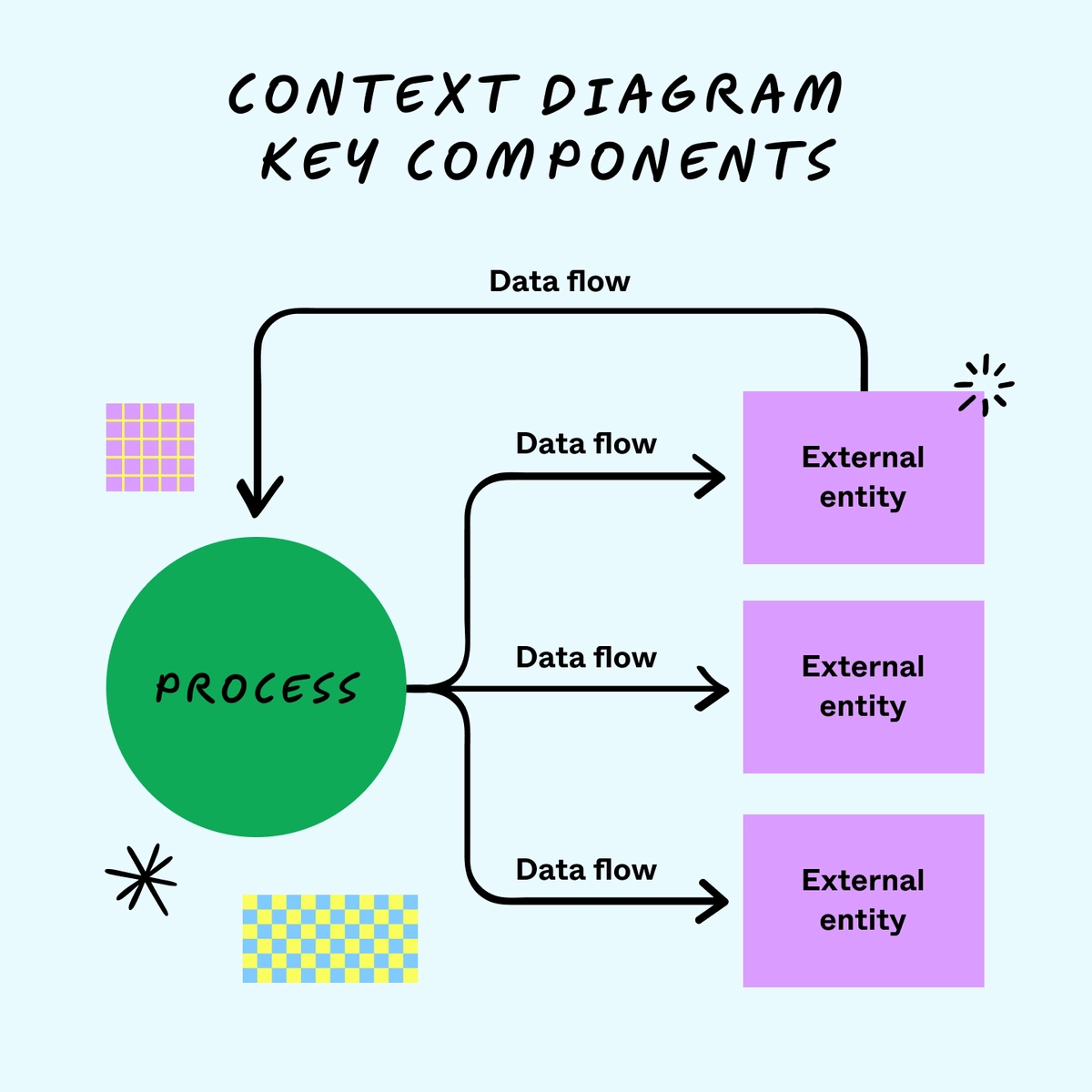
Defining the Purpose of a Contextual Logical Diagram
Look—I’ve lost count of how many times I’ve walked into a room full of smart people, stared at a whiteboard, and watched them argue for forty-five minutes about a system. Not the code. Not the data. The idea of the system. The vision. Everyone’s got a different picture in their head, and nobody’s wrong. That’s the chaos. That’s also why you need a contextual logical diagram.
I’m not talking about some academic relic from a 1980s textbook. I’m talking about a living, breathing tool that answers one question: What are we building, and why does it live where it does? It’s the bridge between a vague concept and a detailed design. Without it, you’re just guessing. With it? You’ve got a map that everyone can read. Seriously, it’s the most underrated piece of documentation in the entire software engineering toolkit.
We’re going to dive deep here. Forget the fluff. Forget the buzzwords. I want you to understand what a contextual logical diagram actually does, when to reach for it, and why it saves you from the slow, painful death of misaligned teams. Let’s get into it.
The Core Purpose: Why Context Matters More Than You Think
A contextual logical diagram isn’t about data flows or database schemas. It’s about boundaries. It answers the fundamental question: What is inside our system, and what is outside of it? This might sound simple, but honestly? Most project failures start because nobody ever agreed on that boundary. You get scope creep, integration nightmares, and developers building features for users who don’t exist.
This diagram is your single source of truth for system interactions. It shows your application as a single black box in the middle, surrounded by the external actors it talks to. Those actors can be human users, third-party APIs, legacy databases, or even other internal systems. The purpose of a contextual logical diagram is to define these relationships without getting bogged down in internal logic. It’s the 10,000-foot view that keeps everyone grounded.
Think of it as the first sketch an architect draws before designing a house. You don’t start with the plumbing layout. You start with the lot, the property lines, and the street. The contextual logical diagram is that lot. It establishes the playing field. Without this, you’re just building walls in the dark.
And here’s the kicker—it’s also a negotiation tool. When you show a contextual logical diagram to a stakeholder and point at an external system, you can say, “This data comes from them, not us. We don’t control it. We can’t fix it if it breaks.” That single conversation prevents months of finger-pointing later. It’s a big deal.
#### It’s Not Just a Flowchart (And Here’s the Difference)
I see people confuse contextual logical diagrams with flowcharts all the time. It drives me nuts. A flowchart shows process steps. A contextual logical diagram shows interactions. The difference is subtle but critical.
- A flowchart asks: What happens next? - A contextual logical diagram asks: Who talks to whom?
In a flowchart, you have shapes for decisions, actions, and endpoints. In a contextual logical diagram, you have exactly two things: the system in the center (your box) and external entities (other boxes or stick figures around it). There’s no internal detail. No loops. No conditional branches. It’s pure context.
This simplicity is its superpower. A non-technical product manager can read a contextual logical diagram just as easily as a senior architect. It democratizes understanding. When you start adding arrows that show data moving between the system and an external actor, you’re defining the contract of your application. That’s gold.
Remember, a flowchart is for detailed design. A contextual logical diagram is for strategic alignment. Use the right tool for the right job. If you try to cram internal logic into your context diagram, you’ll end up with a messy, unreadable monster that nobody uses. Keep it clean.
#### The Three Layers of Context You Must Capture
Every solid contextual logical diagram captures three distinct layers. Miss one, and you’ve got a hole in your understanding.
First, the human actors. These are the people who interact with your system. They might be end users, administrators, or external auditors. Each one has a distinct role and a distinct need. A contextual logical diagram should show them as separate entities. If your system serves both customers and support agents, don’t lump them together. They trigger different behaviors.
Second, the external systems. This includes APIs, databases, cloud services, and even legacy mainframes that your system must touch. Be brutally honest here. If you’re pulling data from Salesforce, that’s an external system you don’t control. If you’re writing to a corporate data warehouse, that’s another one. The contextual logical diagram exposes your dependencies.
Third, the shared data stores. This is where it gets tricky. Sometimes, a database is an internal part of your system. Sometimes, it’s a shared resource owned by another team. Clearly label which side owns the data. I’ve seen entire projects derailed because two teams assumed they “owned” the same table. A contextual logical diagram prevents that by explicitly drawing the line.
Here’s a quick checklist I use for every contextual logical diagram:
-
- Is every external entity labeled clearly?
- Are the data flows between entities named (e.g., “User Credentials” or “Payment Request”)?
- Is the system boundary a single, prominent box?
- Are there any unnamed arrows (red flag for incomplete analysis)?
- Can a non-technical person explain the diagram back to you?
Breaking Down the Anatomy of a Contextual Logical Diagram
Let’s get practical. You’re sitting in a room with a whiteboard. You need to draw a contextual logical diagram for your new project . Where do you start? First, grab a marker. Draw one big rectangle in the center. Write the name of your system inside it. That’s the system boundary. Everything inside that box is your responsibility. Everything outside is not. This is the fundamental rule.
Now, draw smaller boxes around it. These are your external actors. They can be people (use stick figures if you want) or other systems (use rectangles). Connect each external actor to your system with a line or arrow. Label that line with the name of the data or interaction that flows across it. For example, “User submits order” flows into your system. “Order confirmation” flows out to the user. Simple.
One mistake I see constantly is people forgetting to show bidirectional flows. An contextual logical diagram isn’t a one-way street. Your system sends data out, and it receives data in. If an arrow only goes one direction, you’re hiding something. For example, a payment gateway sends a success response back to your system. That response is a critical flow. Don’t skip it.
Finally, add a small legend or notes if necessary. Some contextual logical diagrams include a brief description of each interaction. Others rely purely on the arrow labels. Find the balance for your team. I prefer lean diagrams with clear labels. But if your audience needs more detail, a one-sentence note per arrow can save you ten follow-up questions.
#### How It Differs From a System Architecture Diagram
This is a common point of confusion, even among experienced engineers. A system architecture diagram shows the internal components of your application: the web servers, the databases, the message queues, the load balancers. It’s a blueprint for the construction crew. A contextual logical diagram, on the other hand, shows nothing inside your system. It’s a black box. It’s the view from the outside looking in.
Why does this distinction matter? Because the audience is different. A system architecture diagram is for developers and operations teams. They need to know how the pieces fit together. A contextual logical diagram is for stakeholders, product owners, and adjacent teams. They need to know where the boundaries are. They don’t care if you use PostgreSQL or MongoDB inside that box. They care that the box talks to the CRM.
I’ve seen teams skip the contextual logical diagram and go straight to architecture. It’s a disaster. They end up debating deployment strategies before they’ve even agreed on what the system should do. The contextual logical diagram forces alignment before the technical details start flying. It’s the gatekeeper.
Think of it this way: The contextual logical diagram is the “what and where.” The system architecture diagram is the “how.” If you try to do the “how” before you nail the “what and where,” you will rebuild your architecture at least twice. Honestly? I’ve seen teams do it three times. Don’t be that team.
#### When to Update Your Contextual Logical Diagram
A contextual logical diagram isn’t a static artifact you file away and forget. It’s a living document. You should update it whenever your system’s external interfaces change. Add a new third-party API for payment? Update the diagram. Deprecate an old user portal? Remove it from the diagram. Decide to sunset an entire integration? The diagram tells you exactly what you’re cutting loose.
I recommend reviewing your contextual logical diagram at the start of every major sprint or release cycle. Gather the team. Pull up the diagram. Ask one question: Does this still match reality? If the answer is no, you’re behind. Spend thirty minutes fixing it. That thirty minutes will save you days of confusion later.
Neglecting the contextual logical diagram leads to one of the worst outcomes in software: the “ghost interface.” That’s when a feature is built to talk to an external system that no longer exists or has changed its API. The code still points to the old endpoint, and nobody remembers why. It’s debugging hell. Keeping the diagram current prevents that.
Common Questions About the Purpose of a Contextual Logical Diagram
Is a contextual logical diagram the same as a context diagram from UML?
Yes, essentially. In UML (Unified Modeling Language), it’s formally called a “context diagram” or sometimes a “system context diagram.” The contextual logical diagram is the same concept, just with an emphasis on the logical relationships between the system and its environment. The core purpose remains identical: define the system boundary and external interactions.
Do I need a contextual logical diagram for every project, even small ones?
Honestly? Yes, even for small projects. The size of the project doesn’t change the need for clear boundaries. For a tiny script or a microservice, the diagram might be two boxes and three arrows. That’s fine. The act of drawing it forces you to think about who your system actually talks to. I’ve seen “small” projects double in scope because nobody defined the boundary early. The diagram prevents that.
Can a contextual logical diagram replace a requirements document?
No, it cannot. A contextual logical diagram is a visual tool that supports requirements, not a replacement for them. It shows what interacts with the system, but it doesn’t specify the rules of those interactions. For example, the diagram might show a “Payment Request” arrow, but it won’t explain the validation logic or error handling. You still need detailed requirements and user stories. The diagram is the map; the requirements are the travel guide.
What’s the biggest mistake people make when drawing one?
They try to make it too detailed. I see people start drawing internal processes, adding boxes for “authentication service” and “order processing.” That defeats the purpose. Keep it high-level. If you feel the urge to add internal components, step back and ask yourself, “Is this an external actor?” If the answer is no, it doesn’t belong on a contextual logical diagram. Save that detail for the architecture diagram.
How do I validate my contextual logical diagram with stakeholders?
Print it out. Put it on a wall. Walk through it with each stakeholder and ask them to identify their part. If a stakeholder says, “I don’t see my system here,” or “That arrow is wrong,” you’ve found a gap. The goal is to get everyone to nod and say, “Yes, that’s the world we’re building in.” If there’s pushback, dig into it. The diagram is a tool for alignment, not a work of art. It’s okay to change it.
Wrapping Up the Real Value
I’ve been in this field for over a decade, and I can tell you the difference between a team that struggles and a team that flows is often this one diagram. The contextual logical diagram isn’t flashy. It doesn’t have fancy colors or complex notations. It’s just a box in the middle, a few boxes around it, and some labeled arrows. But that simple picture holds the power to prevent miscommunication, reduce rework, and align everyone from the CEO to the junior developer.
The purpose of a contextual logical diagram is to answer the biggest question any software project faces: Where do we stop, and where does the rest of the world begin? Get that answer right, and everything else gets easier. Get it wrong, and you’re building on quicksand. So next time you start a project, don’t open your IDE first. Open a whiteboard. Draw the box. Define the boundaries. Your future self will thank you.
While kopitiam is a place to hang out and chat, annoying threads which make no sense at all will be deleted and offenders warned. Outline · [ standard ] · linear+ [found sos] cant login whatsapp browser, from iphone Outline · [ standard ] · linear+ whatsapp desktop dah jadi fb app 56.9k views My friend said her gf see his whatsapp message instantly after replied or new message.i just confused, don't know how to respond on this.why?this post has been edited by jimmyx:. Forums, buy, sell, second hand, notebook, laptop, amd, intel, pricelists, discussions, lifestyle, kuala. Chat threads must be tagged properly. Lowyat.net malaysia's tech enthusiast resource community.
While kopitiam is a place to hang out and chat, annoying threads which make no sense at all will be deleted and offenders warned. Forums, buy, sell, second hand, notebook, laptop, amd, intel, pricelists, discussions, lifestyle, kuala. Chat threads must be tagged properly. My friend said her gf see his whatsapp message instantly after replied or new message.i just confused, don't know how to respond on this.why?this post has been edited by jimmyx:. Outline · [ standard ] · linear+ [found sos] cant login whatsapp browser, from iphone Outline · [ standard ] · linear+ whatsapp desktop dah jadi fb app 56.9k views Lowyat.net malaysia's tech enthusiast resource community.
Lowyat.net malaysia's tech enthusiast resource community. Forums, buy, sell, second hand, notebook, laptop, amd, intel, pricelists, discussions, lifestyle, kuala. My friend said her gf see his whatsapp message instantly after replied or new message.i just confused, don't know how to respond on this.why?this post has been edited by jimmyx:. While kopitiam is a place to hang out and chat, annoying threads which make no sense at all will be deleted and offenders warned. Outline · [ standard ] · linear+ whatsapp desktop dah jadi fb app 56.9k views Chat threads must be tagged properly. Outline · [ standard ] · linear+ [found sos] cant login whatsapp browser, from iphone
Forums, buy, sell, second hand, notebook, laptop, amd, intel, pricelists, discussions, lifestyle, kuala. My friend said her gf see his whatsapp message instantly after replied or new message.i just confused, don't know how to respond on this.why?this post has been edited by jimmyx:. Outline · [ standard ] · linear+ [found sos] cant login whatsapp browser, from iphone While kopitiam is a place to hang out and chat, annoying threads which make no sense at all will be deleted and offenders warned. Chat threads must be tagged properly. Lowyat.net malaysia's tech enthusiast resource community. Outline · [ standard ] · linear+ whatsapp desktop dah jadi fb app 56.9k views