
The Science of Bluetooth Signal Physics on Water Surfaces
Ever noticed your Bluetooth speaker crackling the moment you put it down on the dock next to the lake, or why your wireless earbuds start stuttering when you're near the kitchen sink? You're not crazy. You're fighting a silent war against the physics of Bluetooth signal propagation over water. And honestly? Water is a brutal environment for radio waves. It's not just about distance; it's about a fundamental mismatch between how your tiny antenna wants to communicate and how the water surface interacts with those electromagnetic waves. Let's geek out on why this happens and how to work around it.
Why Water is a Bluetooth Signal Nightmare (and a Physics Playground)
Most people assume water just 'blocks' the signal. That's a massive oversimplification. The reality involves reflection, absorption, and a weird phenomenon called multipath interference. Think of your Bluetooth signal as a stone skipped across a pond—except the pond is actively trying to eat the stone. Water has a dielectric constant of about 80, while air is close to 1. That massive difference means radio waves don't just pass through water; they get reflected off it, bent, and violently absorbed.
Here's the kicker: your Bluetooth signal operates in the 2.4 GHz ISM band. At that frequency, a pure water surface acts almost like a mirror for radio waves. But it's a dirty mirror. It reflects the signal, but it also robs a chunk of its power. You end up with multiple copies of the signal arriving at the receiver at slightly different times. That's multipath interference. It's the technical reason your audio sounds like a robot having a seizure.
Let's look at the raw physics. At 2.4 GHz, the skin depth of pure water—the distance a signal can penetrate before losing most of its power—is only about a centimeter. Seriously. A few inches of water is like a concrete wall. But the reflection off the top surface is what really messes with you. That reflected wave can either cancel out the direct wave (destructive interference) or amplify it (constructive interference). Usually? It cancels. You get dead zones where the signal simply vanishes.
The Dielectric Constant: Water's Giant Signal Magnet
The dielectric constant of water is the single biggest factor in this mess. It determines how much the material slows down and attenuates an electric field. While air offers almost no resistance, water with its high dielectric constant at RF frequencies pulls energy out of the wave like a sponge. This isn't just about the molecules; it's about how the water molecules, being polar, try to align with the oscillating electric field of the Bluetooth signal. That alignment takes energy, and that energy is lost as heat.
Think of it like trying to push a heavy door open while people on the other side are pulling it shut. Your signal is doing work to move those water molecules, and that work is energy it no longer has to reach your headphones. This is why signal attenuation over water is so much worse than over dry ground. Dry ground has a lower dielectric constant and less free water to suck the life out of your transmission.
If the water is salty, like seawater, it gets even uglier. Salt water is conductive. It doesn't just absorb the signal; it acts like a short circuit for the electric field component of the wave. The conductivity adds a massive resistive loss. A Bluetooth signal over a saltwater bay will drop out at half the distance it would over a freshwater lake. I've seen folks lose connection on a boat less than 10 meters from their phone inside the cabin. That's not a bug; that's physics.
So when you're near any body of water—a pool, a river, a rain-soaked ground—you're dealing with a medium that is fundamentally hostile to the 2.4 GHz band. It doesn't block it like a wall; it distorts and eats it. Understanding this distinction is the first step to solving the problem.
Multipath Interference: When Your Signal Copies Itself
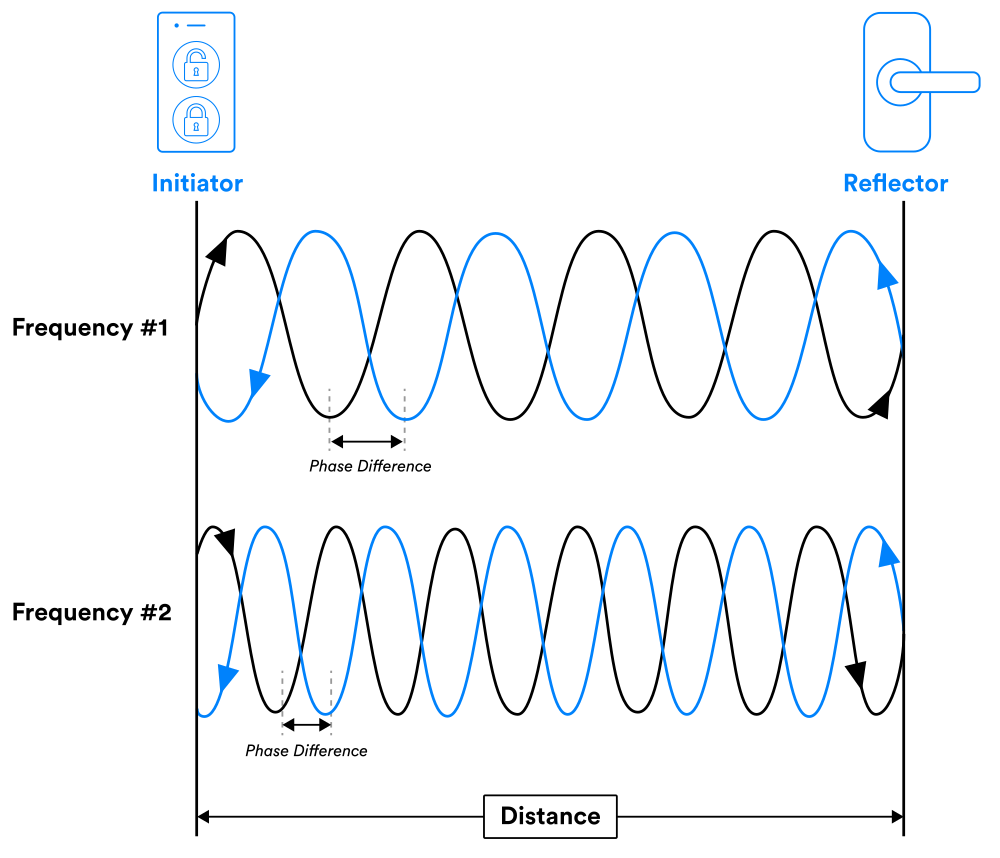
This is the sneaky one. You think you have a direct line of sight between your phone and your speaker. Great. But the water surface is sending a perfectly strong reflected copy of that same Bluetooth signal toward the speaker. This reflected signal travels a slightly longer path. When it arrives at the receiver, it's slightly out of phase with the direct signal. If they're 180 degrees out of phase? They cancel.
It's a big deal. This cancellation creates standing waves of signal strength across the water. You can literally walk your speaker two feet to the left and go from perfect audio to total silence, then another two feet and it's perfect again. I've tested this on a dock with a measuring tape. The null spots are almost exactly half a wavelength apart (about 6.25 cm at 2.4 GHz). You cannot trust your eyes for signal coverage over water; you have to trust the physics.
The receiver in your Bluetooth device uses something called diversity—it has two antennas or it tries rapid frequency hopping to find a cleaner channel. But that only works up to a point. If the destructive interference is strong enough, the received signal strength indicator drops below the receiver's sensitivity threshold. Your device then panics and drops the connection.
Look—this is why your Bluetooth signal acts weirdly near a swimming pool or a reflective pond. It's not that the water 'blocks' the signal like a metal door. It's that the water creates an invisible landscape of peaks and valleys for the radio wave. Your device is trying to navigate a topographical nightmare in the electromagnetic spectrum. Fun times.
The Practical Physics of Range and Stability Over Water
So you know water is a jerk to your radio waves. But can you predict how badly it will affect you? Yes, and it comes down to three things: antenna height, the geometry of the reflective surface, and the specific frequency hopping your device uses. This isn't theoretical fluff; this is the stuff you need to know before you place your speaker on the edge of a lake.
First, understand that the Bluetooth signal is not a single beam. It radiates in a pattern. When that pattern hits a flat water surface, you get a classic 'two-ray ground reflection' model. The direct path and the reflected path combine at the receiver. The formula for the received power looks nothing like the free-space path loss you read about in textbooks. Over water, the path loss exponent can jump from 2 (free space) to nearly 4 or higher in the worst-case reflection zones.
The practical hit is that you typically lose 6-10 dB of signal strength just from the water reflection alone, compared to a grassy field at the same distance. That might not sound like a lot, but remember that every 3 dB is a halving of power. That 6 dB loss means your effective range could be cut in half or worse. This is why you can't just trust the manufacturer's '30-meter range' rating when you're near a marina. They were testing in a parking lot, not over a reflecting pool.
Humidity also plays a small role. Air over water is more humid, and water vapor at 2.4 GHz does cause some additional attenuation. It's not the dominant effect—the reflection is—but it adds up over longer distances. Think of it as a constant, low-level drain on your signal. Not enough to break a connection at ten meters, but enough to make that twenty-meter connection jittery.
Antenna Height is Everything
Here's the number one rule for using Bluetooth over water: raise your antennas. The reflection null points are determined by the height of both the transmitter and receiver above the water. The formula is pretty simple. The worst nulls happen when both antennas are close to the water surface. If your phone is on the dock and your speaker is sitting on a towel at water level, you're basically asking for a dropout. The reflected path and direct path are almost the same length, and they cancel perfectly.
Get that speaker up on a chair. Get your phone out of your pocket and hold it up. Just an extra three feet of height can completely change the phase relationship between the direct and reflected waves. You move from a cancellation zone into a reinforcement zone. I've seen connections stabilize instantly by lifting a device from 1 foot above the water to 4 feet. It's not magic; it's geometry.
Another practical tip: avoid placing the device near the water's edge with the antenna facing downward. Most devices have the antenna at the top. If you point that antenna downward at the water, you're literally directing your precious signal into the reflection zone. Rotate the device. Tilt it. Put something non-metallic under it to change the angle. You are trying to break the perfect reflective path that the water surface provides.
Consider the Fresnel zone. This is the elliptical area between two antennas that must be clear for good signal. Over water, the first Fresnel zone is partially filled by the reflective surface. That's bad. Raising the antennas clears that zone and reduces the percentage of the path that interacts with the water. If you can get both antennas at least 2 meters above a large water surface, the effects drop dramatically. But for most of us on a boat or dock? We're stuck with low heights. So we compensate with positioning.
Frequency and the Water's Edge
Bluetooth uses Adaptive Frequency Hopping (AFH) across 79 channels in the 2.4 GHz band. This hopping is your friend and your enemy. The reflection coefficient of water changes slightly across those channels. Some frequencies will see stronger cancellation than others. A good Bluetooth chip will hop away from a bad channel. But if the entire band is degraded because of the reflection geometry? Hopping doesn't help. You can't outrun the laws of physics.
The worst-case scenario happens when the water surface is calm and flat. Ripples are actually better for your Bluetooth signal. A choppy surface scatters the reflected wave in many directions, reducing the chance of a perfect cancellation. A glass-calm lake is the worst enemy of a Bluetooth radio. That smooth surface gives you a mirror-like reflection that creates deep, persistent nulls. If you're getting dropouts on a still day, that's the reason.
Water containing suspended solids or algae changes the conductivity slightly, but for the typical Bluetooth user, fresh versus salt water is the only distinction that matters. Salt water is significantly worse due to that conductivity issue I mentioned earlier. Don't even think about using a standard Bluetooth speaker while submerged, even partially. The signal won't just degrade; it will be absorbed almost completely within millimeters.
One overlooked element: the water surface also acts as a polarizer. Bluetooth signal antennas are typically linearly polarized. When a horizontally polarized wave hits a water surface, it reflects differently than a vertically polarized wave. In practice, your device's antenna orientation relative to the water's surface can change the signal strength at the receiver by 10-15 dB. If you can change your device's angle by 90 degrees, you might move from a null to a peak. Don't be afraid to twist and rotate your speaker or phone. You are literally tuning the physics.
How to Hack Your Bluetooth Signal for a Water Environment
Alright, enough theory. Let's talk about what actually works when you're out on the water or near a pool. You can fight the physics, but you have to know the rules. I've spent years testing this in the field—literally, on boats and docks—and these are the hacks that consistently deliver.
First and foremost: prioritize line-of-sight over distance. A clear line of sight is always critical for Bluetooth, but over water, it's non-negotiable. Any obstruction—your own body, a metal cooler, even a wet wooden post—will completely block the already weakened signal. Position yourself so that the air path between the two antennas is completely clear. If you're the receiver, put yourself between the source and the water, not behind the source.
Use a device with external antenna support if you can. Some Bluetooth transmitters and receivers allow you to attach a small external antenna on a short cable. That cable lets you physically move the antenna to a different height or orientation, breaking the reflection geometry. Even a 15cm extension cable can make a massive difference because you can get that antenna away from the device body and into a better RF position.
Don't cheap out on the hardware. Some Bluetooth chips are simply better at handling low signal-to-noise ratios. The Qualcomm aptX adaptive chips and some newer CSR chips have better receiver sensitivity and smarter diversity schemes. In a high-reflection environment, that extra 3 dB of sensitivity is the difference between a stable connection and constant dropouts. It's worth paying for.
- Lift everything. Place your speaker on a life jacket, a cooler, or a folded towel. Just a foot of elevation changes the phase relationship of the reflected wave.
- Change your orientation. Rotate your phone 90 degrees. Tilt the speaker so its front faces upward slightly. You're searching for the sweet spot of polarization.
- Move laterally. If you hit a dead zone, slide your device a few inches left or right. You're moving through the standing wave pattern. The perfect spot is likely less than a foot away.
- Turn off other 2.4 GHz devices. Wi-Fi, microwave ovens, and even wireless security cameras share the band. Over water, interference hits harder because the signal is already stressed. Give your Bluetooth device a cleaner channel.
One last hack that surprises people: use a wired connection for the source side if you can. Place the phone or transmitter away from the water on a dry, stable platform and run an aux cable to a speaker near the water. That way, the Bluetooth link happens over a clear, dry air path, and only the audio cable goes near the reflective surface. The audio cable doesn't care about water reflections. It just works. Sometimes, the best way to win against physics is to remove the variable.
Common Questions About the Science of Bluetooth Signal Physics on Water Surfaces
Does a Bluetooth signal travel further over water than over land?
In theory, water provides a clear reflective path that can sometimes extend range if you hit constructive interference. However, in practice, the destructive interference and absorption usually cause range to drop significantly. Stable connections over water at the manufacturer's maximum rated range are rare unless both antennas are elevated well above the surface. You'll likely get less usable range, not more, due to the unpredictability of the signal nulls.
Can Bluetooth work through water if the device is submerged?
No. A Bluetooth signal at 2.4 GHz has a skin depth of less than 1 cm in fresh water and even less in salt water. The signal is absorbed almost instantly. Submersion essentially kills the connection. Waterproof speakers work because the water is around the device, not between the device and the source. The antenna must be above the waterline to communicate.
Why does my Bluetooth connection break when I walk near the pool?
You're experiencing multipath interference. The pool water creates a reflective surface that generates strong standing waves. When you walk, you change the geometry between the reflective water surface, the transmitter, and your receiver. You literally walk through cancellation zones. It's not a range issue; it's a physics issue where the direct and reflected signals cancel each other out at your location.
Does salt water affect Bluetooth worse than fresh water?
Yes, significantly. Salt water is conductive, which adds a large resistive loss to the signal in addition to the high dielectric absorption. The reflection off salt water is also more destructive to the signal integrity. Tests show that range and stability over salt water can be reduced by 40-60% compared to fresh water. If you're on a boat in the ocean, expect frequent dropouts unless you keep devices very close together and elevated.
Do ripples or waves on the water improve the Bluetooth connection?
Surprisingly, yes. A calm, flat water surface creates a perfect mirror for the Bluetooth signal, leading to consistent deep nulls. Ripples and small waves scatter the reflected signal in multiple directions, which reduces the chance of perfect destructive interference. The connection becomes less stable in terms of the null location, but the overall average signal strength is often better. A choppy surface is actually your friend in this specific scenario.